
Contractor Foreman Review
Contractor Foreman is one of the most affordable all-in-one construction management platforms, and this Contractor Foreman review weighs the pricing, features and what verified Contractor Foreman reviews say, so a small or mid-size construction business can decide whether it fits.
On this page
The verdict
Contractor Foreman has quietly become the value benchmark in construction management, and its numbers back it: a 4.5 out of 5 from more than 830 verified reviews, with a standout 4.6 for value for money. It packs 20+ modules, project scheduling and Gantt charts, estimating and invoicing, job costing, daily logs, time cards with GPS, change orders, RFIs, submittals and a client portal, into one platform priced well below the big construction suites.
Where Contractor Foreman separates itself is price and breadth. Plans run from about $49 a month on Basic up to $332 for Unlimited users, a fraction of what Procore or Buildertrend cost, and a free trial lets you test it without being charged upfront. For a small general contractor or subcontractor that wants real construction project management without an enterprise budget, few tools give this much for the money.
The trade-offs are the ones that come with a fast-growing, feature-packed, low-cost product. Reviewers note the interface can feel dense and a little dated, there is a learning curve to the sheer number of modules, and occasional performance or support lag shows up as the company scales. For the price and the feature set, though, Contractor Foreman is one of the best-value construction platforms on the market.
Contractor Foreman at a glance
| Vendor | Contractor Foreman | Category | Construction management software |
|---|---|---|---|
| Best for | small to mid-size general contractors | Starting price | $49-$332/mo |
| Free trial | Yes | Free plan | No |
| User rating | 4.5/5 (835+ reviews) | Our score | 8.6/10 |
| Deployment | Cloud, iOS, Android | Founded | 2014 |
| Headquarters | Forest City, USA | Users | – |
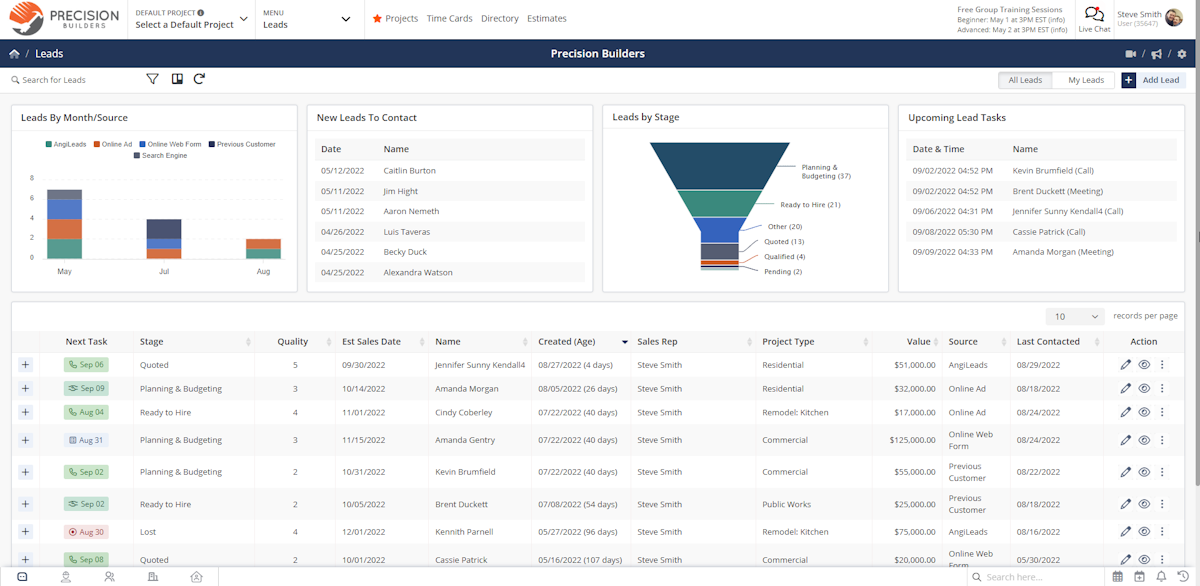
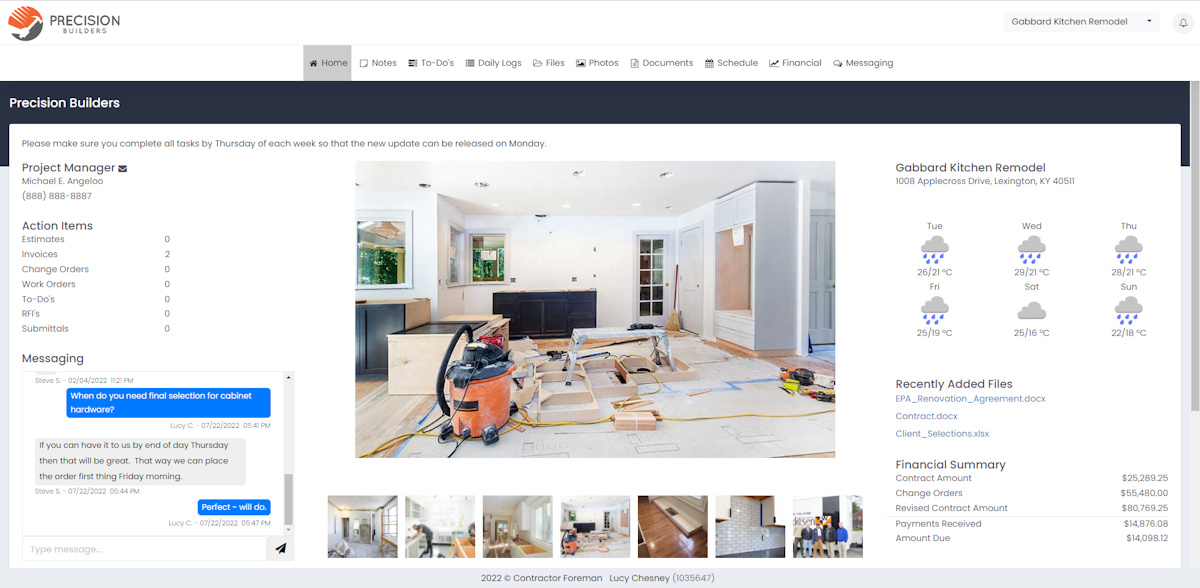
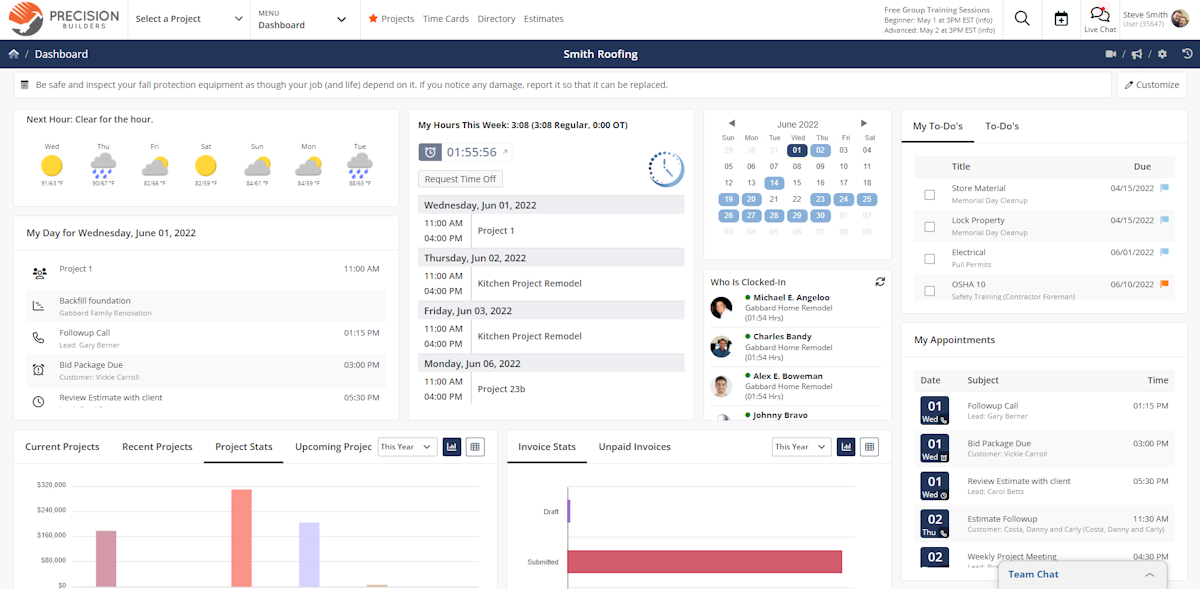
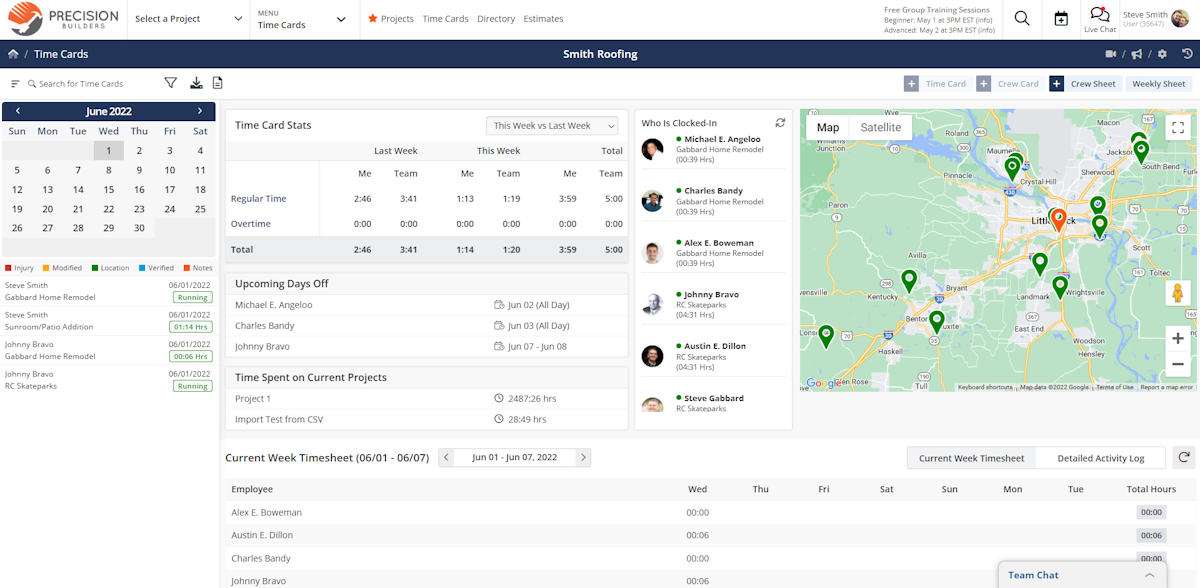
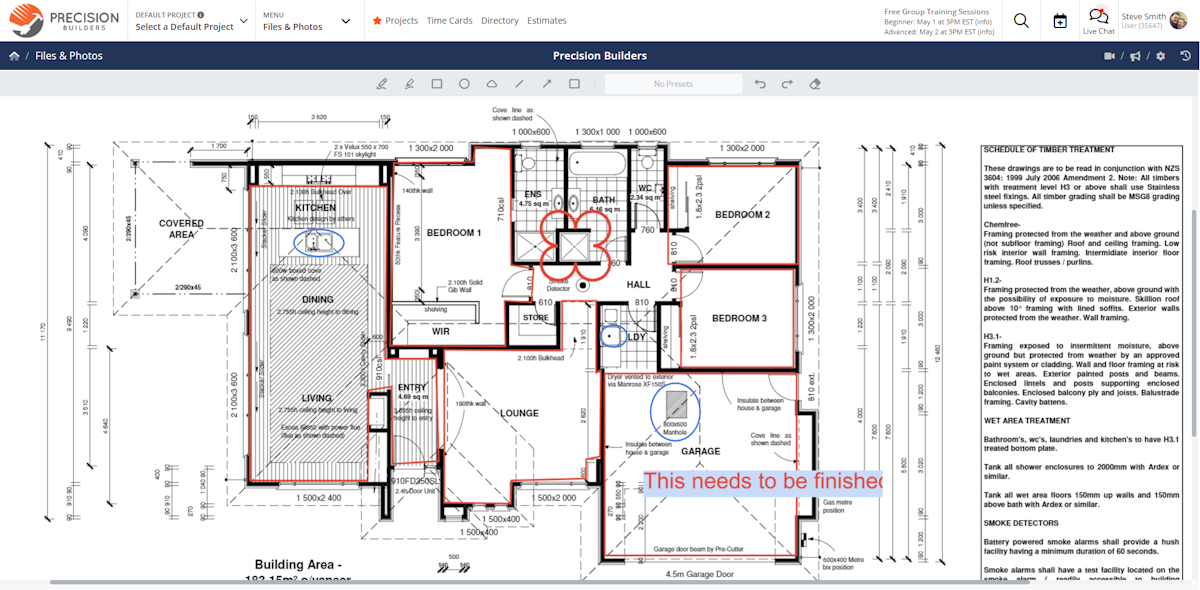
See Contractor Foreman in action
A quick look at the interface, so you know what you are getting before the trial.
What Contractor Foreman does
The areas we lean on most in daily use, and how Contractor Foreman handles each.
Project scheduling & Gantt
A calendar and Gantt-chart scheduling with to-dos and dependencies keep a construction project and its crews on track.
Estimating & invoicing
Build estimates from a cost database, convert to invoices and bills, and send professional quotes that win work.
Job costing & financials
Purchase orders, bills and job costing track every project against budget with two-way QuickBooks sync.
Daily logs & documents
Daily logs, a document library, photos and file sharing keep the project record complete and organised.
Change orders, RFIs & submittals
Handle the construction paperwork, change orders, RFIs and submittals, that residential and commercial jobs generate.
Time cards & GPS
Crew time cards with GPS and scheduling connect the field to the office for accurate payroll and job costing.
Client portal & CRM
A built-in CRM manages leads and a client portal keeps customers updated on their project.
Safety & inspections
Customizable safety, inspection and other forms capture site data and keep jobs compliant.
20+ modules
More than 20 modules in one platform, from bid management to reporting, so a contractor rarely needs a second tool.
How Contractor Foreman works day to day
In daily use, Contractor Foreman aims to run an entire construction business from one place, from the first estimate to the final invoice. A lead becomes an estimate, the estimate becomes a project with a schedule, the crew logs time and daily reports from the field, and the office tracks costs, change orders and invoices against the job, all inside a single all-in-one platform rather than a stack of separate tools.
Project management is the core. A calendar, Gantt-chart scheduling, daily logs, to-dos and a document library keep a construction project organised, and RFIs, submittals, punchlists and change orders handle the paperwork that residential and commercial jobs generate. For a small contractor, having this level of project management at this price is the main draw.
The financial side is unusually deep for the money. Estimating with a cost item database, invoices, bills, purchase orders, job costing and real-time cost tracking give owners clear visibility into labor, material and equipment costs across projects, with two-way QuickBooks sync tying the financial operations together, so a contractor can see whether a project actually made money without exporting to a spreadsheet.
Field and team tools round it out. GPS timecards, crew scheduling, safety and inspection forms, photos and a mobile app keep the field connected to the office, a client portal plus a built-in CRM manage leads and customers, and extensive training resources, video tutorials and webinars help crews get up to speed. It is a lot of feature breadth, which is exactly what reviewers mean when they call it an all-in-one.
Across Contractor Foreman reviews the pattern is consistent, and it is worth reading a spread of them before you buy. Reviewers praise the value, the all-in-one platform, the extensive feature set, the training resources and responsive customer support over chat, which helps teams stay organized and gain visibility across projects, and is why it holds a 4.5 out of 5 with a 4.6 for value for money. The most common complaints in Contractor Foreman software reviews are an interface that can feel dense and dated, a learning curve from the number of modules, clunky scheduling and limited form customization, and occasional performance or support hiccups.
The honest ceiling is polish and scale. A large enterprise contractor that needs the depth and refinement of Procore, deeper AIA billing, or reporting for bird's-eye visibility across many projects may find Contractor Foreman busy and utilitarian. It rewards small and mid-size contractors who value features and price over gloss.
Contractor Foreman is built for the construction trades, and its reviews come from across them: residential and commercial general contractors, remodelers and home builders, and subcontractors in electrical, plumbing, HVAC, concrete, roofing, framing and other specialty trades. Founded in Forest City, North Carolina in 2014 and still independently run, it has grown by undercutting the big suites on price.
Compared with rivals, Contractor Foreman competes on value. It is far cheaper than Procore or Buildertrend while covering much of the same construction project management ground, and it is deeper on estimating, job costing and financial tracking than a field-service tool like Jobber, which is why budget-conscious contractors shortlist it.
Contractor Foreman pros and cons
Pros
- Outstanding value: a huge feature set at a fraction of rival prices (4.6 for value)
- 20+ modules covering estimating, project management and financials
- Free trial with no upfront charge, and users included by tier
- Strong construction paperwork: change orders, RFIs, submittals
- Responsive, well-rated customer support
Cons
- Interface can feel dense and a little dated
- Learning curve from the sheer number of modules
- Occasional performance or support lag as the company scales
- Less polished than premium suites like Procore
- More than a simple field-service crew needs
Who should use Contractor Foreman, and who should skip it
A great fit if you
- You run a small or mid-size construction business
- You are a residential or commercial general contractor or subcontractor
- You want real construction project management without an enterprise budget
- You value a huge feature set and low price over a polished interface
- You want estimating, job costing and scheduling in one platform
Look elsewhere if you
- You are a large enterprise contractor needing Procore-level depth and polish
- You want the most modern, streamlined interface above all
- You only need simple field-service quoting and invoicing
- You are not willing to invest time learning many modules
Is Contractor Foreman right for your trade?
Contractor Foreman is used across the main home-service trades. Here is how it fits each one, and what its reviews tend to say in that niche.
Contractor Foreman for General contracting
Residential and commercial general contractors use Contractor Foreman for scheduling, estimating, job costing and the change orders and RFIs a build generates.
Contractor Foreman for Remodeling
Remodelers manage estimates, selections, daily logs and client communication on renovation projects from one platform.
Contractor Foreman for Home building
Home builders use Gantt scheduling, budgets and a client portal to keep custom-home projects and buyers on track.
Contractor Foreman for Electrical
Electrical subcontractors track project labor, materials and change orders and bill against budget with job costing.
Contractor Foreman for Plumbing
Plumbing contractors use estimating, scheduling and time cards to run project and service work affordably.
Contractor Foreman for HVAC
HVAC contractors manage installs and projects with estimates, job costing and QuickBooks sync; its HVAC-focused reviews praise the value.
Contractor Foreman for Concrete
Concrete contractors build assembly-based estimates and track materials, crews and costs against each pour.
Contractor Foreman for Roofing
Roofing companies estimate by area, manage crews and change orders, and share progress with the client portal.
Contractor Foreman for Framing & carpentry
Framing and carpentry subs schedule crews, log daily production and track labor against the budget.
Contractor Foreman for Landscaping & hardscape
Landscaping and hardscape contractors quote projects, schedule crews and manage change orders in one place.
Contractor Foreman for Painting
Painting contractors build detailed estimates, track job costs and keep clients updated through the portal.
Contractor Foreman for Specialty trades
Specialty subcontractors use the 20+ modules to run project management, financials and field work without a second tool.
Contractor Foreman scorecard
How Contractor Foreman scored across our rubric. Every tool is measured on the same areas.
Contractor Foreman pricing and plans
Real starting prices, dated and re-checked each pass. Contractor Foreman runs five tiers on annual billing, from about $49/mo (Basic) through Standard ($105), Plus ($166) and Pro ($221) to $332/mo for Unlimited users; month-to-month is higher. Higher tiers add modules, users and storage, and the top tier includes unlimited users. A free trial is available and you are not charged until it ends.
- Core project management
- Estimates and invoices
- Daily logs and scheduling
- QuickBooks integration
- Free trial, no upfront charge
- Everything in Basic
- More users and projects
- Job costing and financials
- Change orders and RFIs
- Client portal
- Everything in Standard
- More users and storage
- Submittals and bid management
- Advanced reporting
- Priority support
- Everything in Plus
- Higher user and project limits
- Full module access
- API access
- Onboarding help
- Everything in Pro
- Unlimited users
- Highest limits
- All 20+ modules
- Best value for larger crews
Contractor Foreman integrations
Tools Contractor Foreman connects with out of the box, so it fits the stack you already run.
 QuickBooks Online
QuickBooks Desktop
QuickBooks Online
QuickBooks Desktop
 Zapier
 Google Calendar
 CompanyCam
 Stripe
Support, training and deployment
How you can reach the Contractor Foreman team, how they onboard you, and where it runs.
Support
- Email / Help Desk
- Phone Support
- Chat
- Knowledge Base
Training
- Live Online
- Webinars
- Documentation
- Videos
Deployment
- Cloud, SaaS, Web-Based
- Mobile - Android
- Mobile - iPhone / iPad
Typical customers
- Freelancers
- Small businesses
- Mid-size businesses
Contractor Foreman alternatives
If Contractor Foreman is not the fit, these are the closest tools we rank, in order.




How to test Contractor Foreman before you commit
Every tool demos well. These are the checks that actually tell you whether Contractor Foreman fits your shop, while the free trial is still running.
Run a real job end to end
- Book it, schedule it, dispatch a tech, then invoice and take payment
- Do it on the phone your techs actually carry, not a demo laptop
- Try it with weak signal in the field, not just on office wifi
- Add a second user and watch how the per-seat price moves
Watch for the catch
- Payment-processing fees taken on every card and ACH run
- Features quietly locked to a higher tier than the one you tried
- Onboarding or data import sold as a paid add-on
- How hard it is to export your data if you decide to leave
Contractor Foreman FAQ
How much does Contractor Foreman cost?
Contractor Foreman runs five tiers on annual billing: Basic about $49/mo, Standard $105, Plus $166, Pro $221, and Unlimited $332 for unlimited users. Month-to-month is higher. A free trial is available and you are not charged until it ends.
What do Contractor Foreman reviews say?
Across Contractor Foreman reviews the pattern is consistent: users rate it 4.5 out of 5 from more than 830 reviews, with a standout 4.6 for value for money, and praise the huge feature set and the price. The most common criticisms are a dense, dated interface and a learning curve from the number of modules.
Is Contractor Foreman worth it?
For a small or mid-size construction business, yes. Contractor Foreman gives you estimating, project management, job costing, scheduling and 20+ modules for a fraction of what the big suites cost, which is why it holds a 4.6 for value. It is less worth it for an enterprise that needs Procore-level polish.
Contractor Foreman vs Procore: which should I choose?
Procore is the enterprise standard with more depth, polish and a much higher price. Contractor Foreman covers much of the same construction project management ground for a small fraction of the cost. Small and mid-size contractors usually pick Contractor Foreman on value; large enterprise builders lean to Procore.
Contractor Foreman vs Buildertrend: which is better?
Both are all-in-one construction platforms for small to mid-size builders. Buildertrend is more polished and client-experience focused but costs more; Contractor Foreman is cheaper and packs more modules for the money. Choose Contractor Foreman for value and breadth, and Buildertrend for a more refined interface.
Contractor Foreman vs Jobber: which fits my business?
Jobber is a field-service tool for home-service crews doing quick jobs. Contractor Foreman is construction project management, with estimating, job costing, Gantt scheduling, RFIs and change orders. Choose Contractor Foreman for project-based construction work and Jobber for service-based home jobs.
Does Contractor Foreman have a free trial?
Yes. Contractor Foreman offers a free trial, and unlike some rivals you are not charged upfront, you are billed only when the trial ends. There is no permanent free plan.
Does Contractor Foreman do estimating and invoicing?
Yes. Estimating from a cost database, invoices, bills, purchase orders and job costing are core modules, with two-way QuickBooks sync, so contractors can quote, bill and track profit in one place.
Does Contractor Foreman have a mobile app?
Yes. A mobile app for iOS and Android lets crews log time with GPS, file daily logs, capture photos and access project details from the field, keeping the job site connected to the office.
Is Contractor Foreman good for small contractors?
Yes. It is designed for small and mid-size construction businesses, and the overwhelming majority of its reviewers are small contractors. Users are included by tier and the price is a fraction of enterprise suites, which fits a small contractor's budget.
Does Contractor Foreman integrate with QuickBooks?
Yes. Contractor Foreman syncs two-way with QuickBooks Online and Desktop, alongside other integrations, so estimates, invoices and job costs flow into your accounts without double entry.
Contractor Foreman reviews from real users
Verified reviews from people running Contractor Foreman in the field. Every review is read by our team before it goes live, so this is honest signal, not spam.
No user reviews yet. If you use Contractor Foreman, be the first to tell other shops how it works in the real world.
You need a free account to post a review. Create one in under a minute and you will come right back here to write it.
Why our ranking is worth trusting
“We run a real week of jobs through every tool and score it against the same 40 points. If it wins, it earned it, and no vendor can change that.”
The Duhari review teamNot sure which tool fits?
Start from the full ranking, filtered by your trade and crew size, and pick the right tool with honest scores and real starting prices.