
ServiceTrade Review
ServiceTrade is a field service management platform built specifically for commercial service contractors, and this ServiceTrade review weighs the pricing, features and what verified ServiceTrade reviews say, so an HVAC, mechanical or fire-protection contractor can decide whether it fits.
On this page
The verdict
ServiceTrade is the platform commercial service contractors reach for, and its 4.6 out of 5 from more than 340 verified reviews backs that up, with a standout 4.7 for customer service. It is purpose-built for commercial work rather than one-off residential jobs: scheduling and dispatch, work orders, a strong technician mobile app, recurring service agreements, inspections and compliance, and a customer portal that turns completed work into professional after-service reports.
Where ServiceTrade separates itself is the sales and customer-experience layer for commercial contractors. Field techs document deficiencies with photos on site, the office turns them into quotes, and the online customer portal gives building owners and facility managers a clear record of every visit. Reviewers consistently credit it for helping them win more repair and replacement revenue from the service work they already do.
The trade-offs are that it is built for a specific buyer. ServiceTrade uses quote-based pricing with no public rates and no free trial, the entry plan starts at around five technicians, and a very small or purely residential shop will find it more platform than they need. For a growing commercial HVAC, mechanical, fire or refrigeration contractor, though, ServiceTrade is worth it and one of the most focused tools in the category.
ServiceTrade at a glance
| Vendor | ServiceTrade | Category | Field service management |
|---|---|---|---|
| Best for | commercial mechanical, fire and HVAC contractors | Starting price | Custom quote |
| Free trial | Demo only | Free plan | No |
| User rating | 4.6/5 (340+ reviews) | Our score | 8.7/10 |
| Deployment | Cloud, iOS, Android | Founded | 2012 |
| Headquarters | Durham, USA | Users | – |
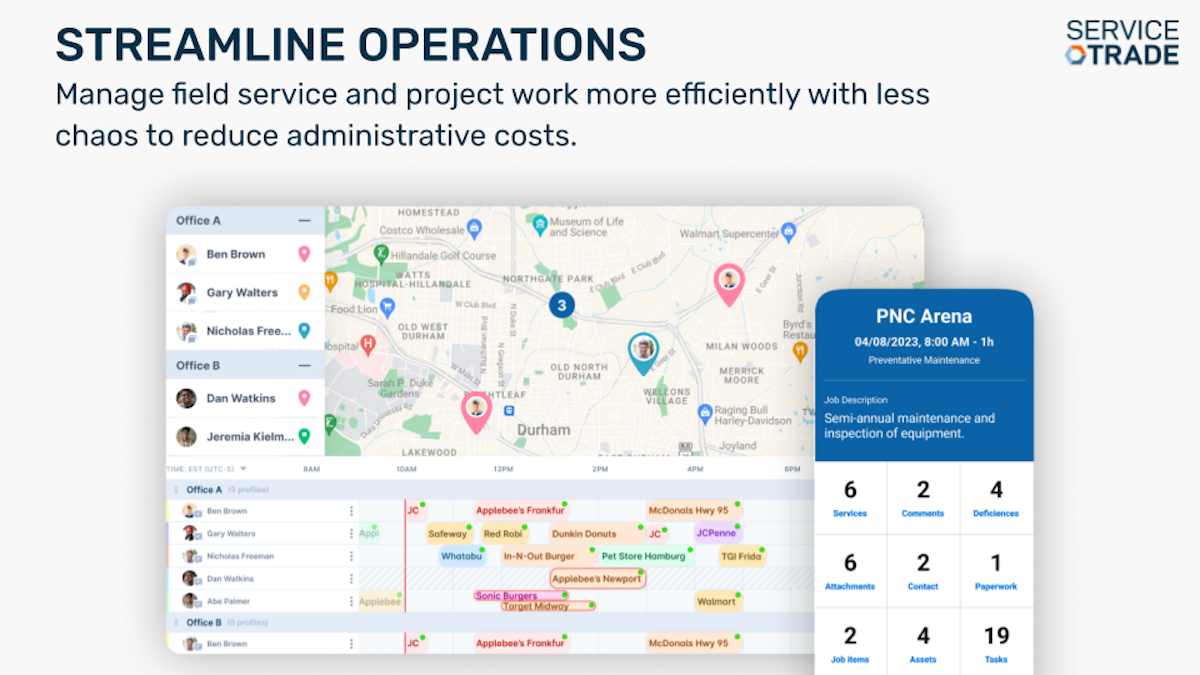
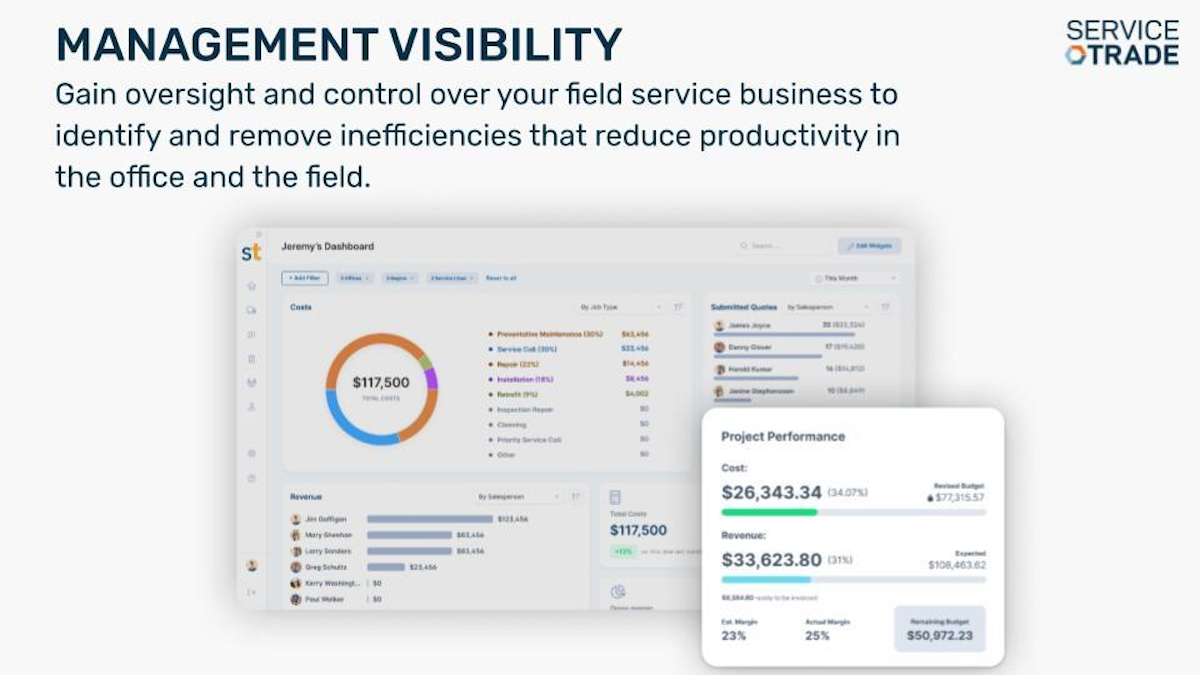
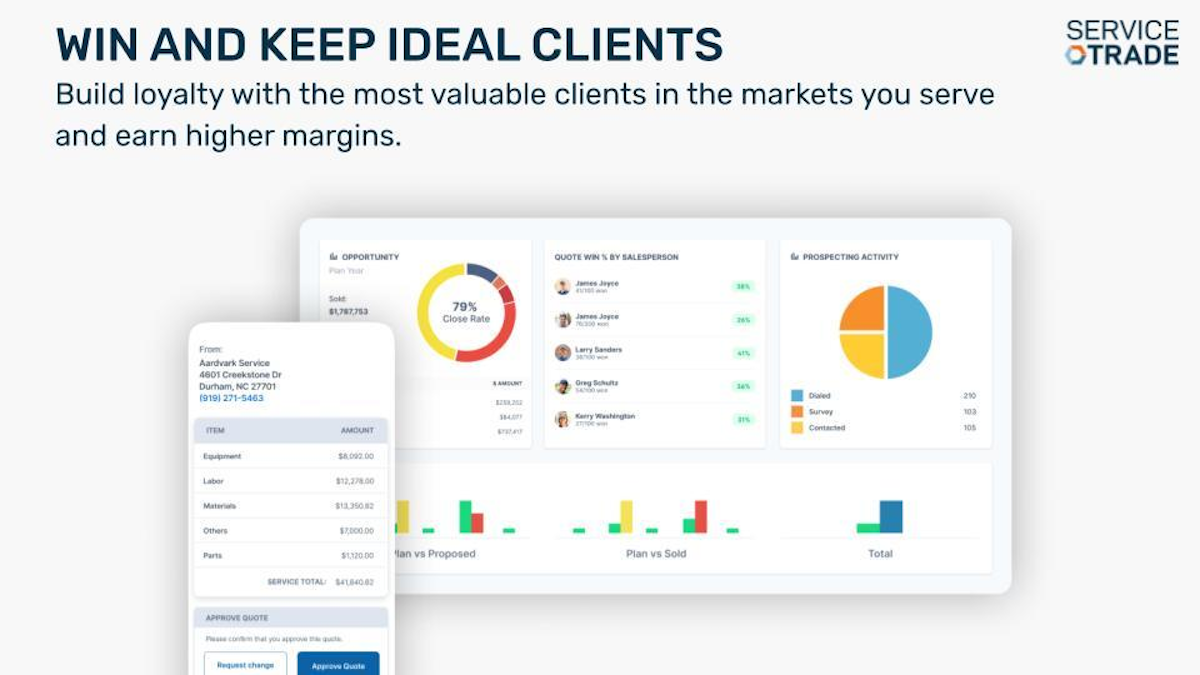
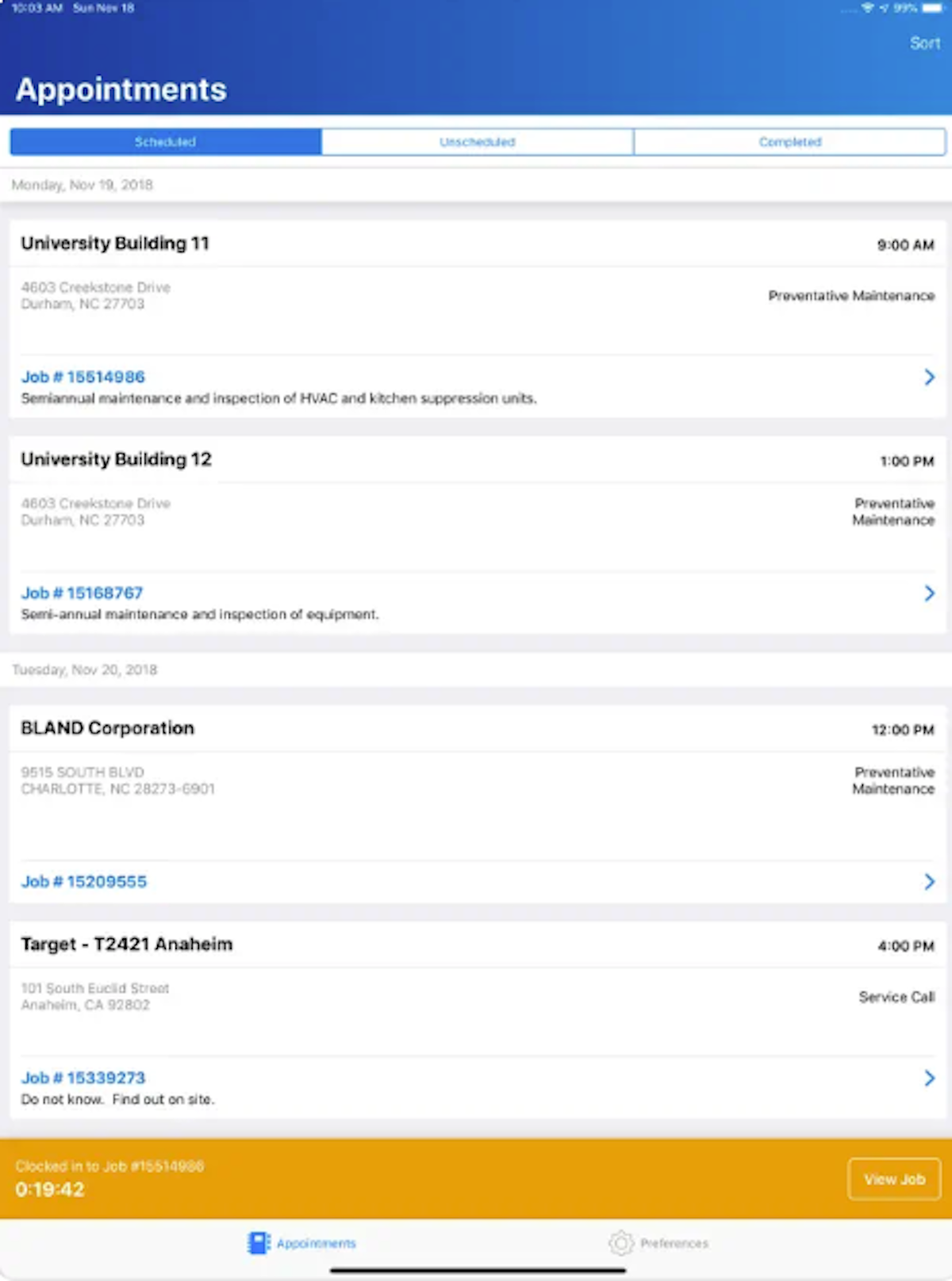
See ServiceTrade in action
A quick look at the interface, so you know what you are getting before the trial.
What ServiceTrade does
The areas we lean on most in daily use, and how ServiceTrade handles each.
Scheduling & dispatch
A drag-and-drop dispatch board with GPS tracking, route optimisation and real-time job status to keep a team of technicians moving across commercial sites.
Work order management
Create, assign and track work orders with full asset and service history attached to every piece of equipment and building.
Technician mobile app
On site, techs see service history, work through inspection checklists, capture photos, document deficiencies and collect signatures from a phone or tablet.
Customer portal & reports
Its signature. Every visit produces a branded online report with photos that building owners and facility managers can see, building trust and repeat work.
Quoting & sales CRM
Documented deficiencies become same-day quotes, and a sales CRM manages the funnel, turning routine service into repair and replacement revenue.
Service agreements
Manage recurring maintenance contracts and auto-generate scheduled work, built for the commercial, contract-driven service model.
Inspections & compliance
Inspection and compliance workflows for fire-protection and mechanical contractors that run scheduled, code-driven work.
Billing & invoicing
Raise invoices and sync two-way with QuickBooks and other accounting tools so billing keeps pace with the field.
Open API & integrations
An open ServiceTrade API and integrations connect it to accounting, GPS and the wider commercial-contractor stack.
Preventive maintenance & Smart AI
Preventive-maintenance scheduling plus Smart AI features automate recurring work and sales follow-up on the higher tiers.
How ServiceTrade works day to day
In daily use, ServiceTrade runs the commercial service cycle from one place. A service call or a scheduled maintenance visit becomes a work order on the dispatch board, the right technician is routed to the site with the full asset and service history, and the visit closes out with photos, a signed report and an invoice. The office and the field work from the same live picture, which is what a multi-technician commercial contractor needs.
Scheduling and dispatching sit at the center. A drag-and-drop dispatch board, GPS location tracking and route optimisation, automated scheduling and real-time job status keep field operations and a team of technicians moving across commercial sites, planned maintenance and reactive calls in the same week.
The technician mobile app is a real strength. On site, a tech sees the customer's equipment and service history, works through inspection checklists, captures photos and notes, documents deficiencies, and collects a signature, all from a phone or tablet, even for complex commercial equipment across multiple buildings.
The customer portal and after-service reports are ServiceTrade's signature. Every visit produces a branded online report with photos and recommendations that building owners and facility managers can see, which builds trust and makes the case for repairs. Paired with the sales CRM and quoting, techs' documented deficiencies become quotes the office can send the same day, turning routine service into repair and replacement revenue.
Recurring service agreements and inspections are built for the commercial model. ServiceTrade manages maintenance contracts, auto-generates recurring work, and handles inspection and compliance workflows, which matters for fire-protection and mechanical contractors that live on scheduled, code-driven work. Billing and invoicing sync two-way with QuickBooks, business reporting and analytics dashboards track operations, customizable forms and reports capture site data, and a client database with automated customer communication keeps every account's history in one place. An open ServiceTrade API and integrations connect the wider stack.
Across ServiceTrade reviews the pattern is consistent, and it is worth reading a spread of them before you buy. Reviewers praise the customer portal, the mobile app, the real-time service history and responsive support, which is why it holds a 4.6 out of 5 with a 4.7 for customer service. The most common complaints in ServiceTrade software reviews are quote-based pricing that is not public and higher than entry-level tools, offline functionality that can be spotty for technicians in the field, and reporting and setup that take time to master.
The honest ceiling is fit and cost. ServiceTrade is deliberately built for commercial contractors with several technicians, so a solo operator or a purely residential shop will find it heavier and pricier than a tool like Jobber, and there is no free trial to test it first. It rewards contractors who will use the service agreements, inspections, reporting and customer-portal depth.
ServiceTrade is built for the commercial trades, and its reviews come from across them: fire-protection, HVAC and mechanical contractors, commercial refrigeration, plumbing and electrical firms, food-service equipment and building-automation companies, and facilities-services providers. Founded in Durham, North Carolina in 2012, it now serves commercial service contractors across the US.
Compared with rivals, ServiceTrade sits between simple small-crew apps and heavy enterprise suites. It is far deeper on commercial service agreements, inspections, reporting and the customer portal than Jobber or Housecall Pro, and more focused and affordable than an all-encompassing enterprise platform like ServiceTitan, which is why commercial contractors shortlist it.
ServiceTrade pros and cons
Pros
- Purpose-built for commercial service contractors
- Standout customer portal and after-service reports (4.7 for support)
- Strong technician mobile app with inspections and photo documentation
- Service agreements and compliance workflows built in
- Turns documented deficiencies into same-day quotes and revenue
Cons
- Quote-based pricing, not public and higher than entry-level tools
- No free trial to test it first
- Offline functionality can be spotty for field technicians
- QuickBooks invoicing integration can feel clunky for some
- Reporting and setup take time to master; entry plan starts at ~5 technicians
Who should use ServiceTrade, and who should skip it
A great fit if you
- You run a commercial service contracting business with several technicians
- You do fire protection, HVAC, mechanical, refrigeration or facilities work
- You want recurring service agreements and inspection workflows built in
- You want a customer portal and after-service reports for commercial clients
- You want to turn service visits into quoted repair revenue
Look elsewhere if you
- You are a solo operator or a very small crew
- You run mostly one-off residential jobs
- You want a low, public, self-serve price with a free trial
- You need to be fully live in a single weekend
Is ServiceTrade right for your trade?
ServiceTrade is used across the main home-service trades. Here is how it fits each one, and what its reviews tend to say in that niche.
ServiceTrade for Fire protection
Fire-protection contractors use ServiceTrade for inspection and compliance workflows, code-driven recurring work and branded reports for building owners.
ServiceTrade for HVAC
Commercial HVAC contractors run planned maintenance, asset history and quoted repairs; its HVAC software reviews praise the customer portal and sales lift.
ServiceTrade for Mechanical
Mechanical contractors manage multi-building assets, service agreements and technician dispatch across complex commercial sites.
ServiceTrade for Refrigeration
Commercial refrigeration firms track equipment history and compliance and turn service calls into replacement quotes.
ServiceTrade for Commercial plumbing
Commercial plumbing contractors use work orders, recurring maintenance and the customer portal for facility and property clients.
ServiceTrade for Commercial electrical
Commercial electrical firms manage scheduled service, inspections and quoted upgrade work from one platform.
ServiceTrade for Food service equipment
Food-service equipment service companies use asset history, checklists and fast quoting to keep kitchens running.
ServiceTrade for Building automation
Building-automation and controls contractors document work and deliver clear reports to facility managers.
ServiceTrade for Facilities services
Facilities-services providers coordinate multi-site recurring work with dispatch, portals and service agreements.
ServiceTrade for Overhead doors
Commercial overhead-door and dock-equipment contractors track assets, schedule maintenance and quote repairs on site.
ServiceTrade scorecard
How ServiceTrade scored across our rubric. Every tool is measured on the same areas.
ServiceTrade pricing and plans
Real starting prices, dated and re-checked each pass. ServiceTrade uses quote-based pricing across three plans, Select, Premium and Enterprise, and does not publish rates. The entry Select plan starts at around five technicians and includes QuickBooks integration and live support (9am to 7pm ET); pricing scales with technicians and modules. There is no free trial; contact sales for a tailored quote and demo.
Starts at Custom quote.
ServiceTrade integrations
Tools ServiceTrade connects with out of the box, so it fits the stack you already run.
 QuickBooks Online
QuickBooks Enterprise
QuickBooks Online
QuickBooks Enterprise
 Sage Accounting
ComputerEase
Sage Accounting
ComputerEase
 Zapier
Support, training and deployment
How you can reach the ServiceTrade team, how they onboard you, and where it runs.
Support
- Email / Help Desk
- Phone Support
- Chat
- Knowledge Base
Training
- Live Online
- Webinars
- Documentation
- Videos
Deployment
- Cloud, SaaS, Web-Based
- Mobile - Android
- Mobile - iPhone / iPad
Typical customers
- Small businesses
- Mid-size businesses
- Enterprises
ServiceTrade alternatives
If ServiceTrade is not the fit, these are the closest tools we rank, in order.




How to test ServiceTrade before you commit
Every tool demos well. These are the checks that actually tell you whether ServiceTrade fits your shop, while the free trial is still running.
Run a real job end to end
- Book it, schedule it, dispatch a tech, then invoice and take payment
- Do it on the phone your techs actually carry, not a demo laptop
- Try it with weak signal in the field, not just on office wifi
- Add a second user and watch how the per-seat price moves
Watch for the catch
- Payment-processing fees taken on every card and ACH run
- Features quietly locked to a higher tier than the one you tried
- Onboarding or data import sold as a paid add-on
- How hard it is to export your data if you decide to leave
ServiceTrade FAQ
Who is ServiceTrade best for?
ServiceTrade is best for commercial service contractors, such as fire-protection, HVAC, mechanical, refrigeration, plumbing and electrical firms with several technicians, that run recurring maintenance and inspection work and want to turn service visits into quoted repair revenue.
How much does ServiceTrade cost?
ServiceTrade uses quote-based pricing across three plans, Select, Premium and Enterprise, and does not publish rates. The entry Select plan starts at around five technicians and includes QuickBooks integration and live support; pricing scales with technicians and modules. Contact sales for a quote.
What do ServiceTrade reviews say?
Across ServiceTrade reviews the pattern is consistent: commercial contractors rate it 4.6 out of 5 from more than 340 reviews, with a standout 4.7 for customer service, and praise the customer portal, mobile app and how it drives repair revenue. The most common criticisms are quote-based pricing and a learning curve.
ServiceTrade vs ServiceTitan: which should I choose?
Both target commercial and home-service contractors, but ServiceTrade is more focused and typically more affordable, built around commercial service agreements, inspections and the customer portal. ServiceTitan is a broader, heavier enterprise platform with a higher cost and longer implementation. Commercial contractors that want focus over breadth often prefer ServiceTrade.
ServiceTrade vs Jobber: which is better for me?
Jobber is simpler and cheaper for small residential home-service crews. ServiceTrade is built for commercial contractors, with service agreements, inspections, compliance and a customer portal that Jobber does not match. Choose ServiceTrade for commercial work and Jobber for small residential jobs.
Does ServiceTrade have a mobile app?
Yes. The ServiceTrade technician mobile app lets field techs view equipment and service history, complete inspection checklists, capture photos, document deficiencies, collect signatures and close work orders from a phone or tablet on commercial sites.
Does ServiceTrade handle inspections and fire protection?
Yes. Inspection and compliance workflows are a core strength, and fire-protection contractors are one of ServiceTrade's largest customer groups. It manages code-driven recurring inspections, deficiency documentation and the reports building owners require.
Does ServiceTrade have a customer portal?
Yes, and it is a signature feature. Every visit produces a branded online report with photos and recommendations that building owners and facility managers can view, which builds trust and helps win repair and replacement work.
Does ServiceTrade have an API?
Yes. ServiceTrade offers an open API alongside built-in integrations with QuickBooks and other tools, so commercial contractors can connect it to accounting, GPS and the rest of their software stack.
Does ServiceTrade offer a free trial?
No. ServiceTrade does not offer a public free trial or free plan. It uses quote-based pricing and offers a guided demo, so you evaluate it with the sales team rather than self-serve.
What are ServiceTrade's main downsides?
The most common ones reviewers cite are quote-based pricing that is not public and higher than entry-level tools, no free trial, an entry plan aimed at around five or more technicians, and reporting and setup that take time to master.
ServiceTrade reviews from real users
Verified reviews from people running ServiceTrade in the field. Every review is read by our team before it goes live, so this is honest signal, not spam.
No user reviews yet. If you use ServiceTrade, be the first to tell other shops how it works in the real world.
You need a free account to post a review. Create one in under a minute and you will come right back here to write it.
Why our ranking is worth trusting
“We run a real week of jobs through every tool and score it against the same 40 points. If it wins, it earned it, and no vendor can change that.”
The Duhari review teamNot sure which tool fits?
Start from the full ranking, filtered by your trade and crew size, and pick the right tool with honest scores and real starting prices.