Jobber is the field service management software most small home-service crews start with. This Jobber review pulls together the pricing, features and what thousands of verified Jobber reviews actually say, so a small business can decide fast whether it is the right fit.
Data-driven analysisVerified user reviewsIndependent scoringZero pay-to-rank
Jobber is the field service management software we recommend first for most small home-service businesses, and the review data backs it up. It holds a 4.6 out of 5 across Capterra and G2 from thousands of verified reviews, with its highest marks for ease of use and customer support. Jobber runs the full job cycle cleanly: online booking, quoting, scheduling and dispatch, then invoicing and card or ACH payment, all tied to one of the best-rated mobile apps in the category (4.8 on iOS, 4.7 on Android).
Where Jobber earns its price is speed to value. There is no six-month implementation and no long lock-in contract, so a two to ten person crew can be live in a weekend. Jobber pricing starts at $29 per month on the annual Core plan and climbs through Connect ($99), Grow ($149) and Plus ($399), so a growing shop can step up a tier as it needs more automation rather than paying for enterprise features on day one.
The trade-offs appear as you scale. There is no built-in inventory or parts management, offline functionality is thin when signal drops, and the automation and job-costing features most shops actually want sit on the higher Grow and Plus tiers, so the real monthly cost climbs faster than the headline Core price suggests. For a landscaping, lawn care, cleaning, HVAC or plumbing business with 1 to 15 field staff, though, Jobber is worth it: few tools take you from quote to paid this quickly with this little setup.
Jobber at a glance
Vendor
Jobber Software
Category
Field service management
Best for
small to mid-size home-service crews
Starting price
$29-$399/mo
Free trial
Yes
Free plan
No
User rating
4.6/5 (3,000+ reviews)
Our score
8.8/10
Deployment
Cloud, iOS, Android
Founded
2011
Headquarters
Edmonton, Canada
Users
250,000+
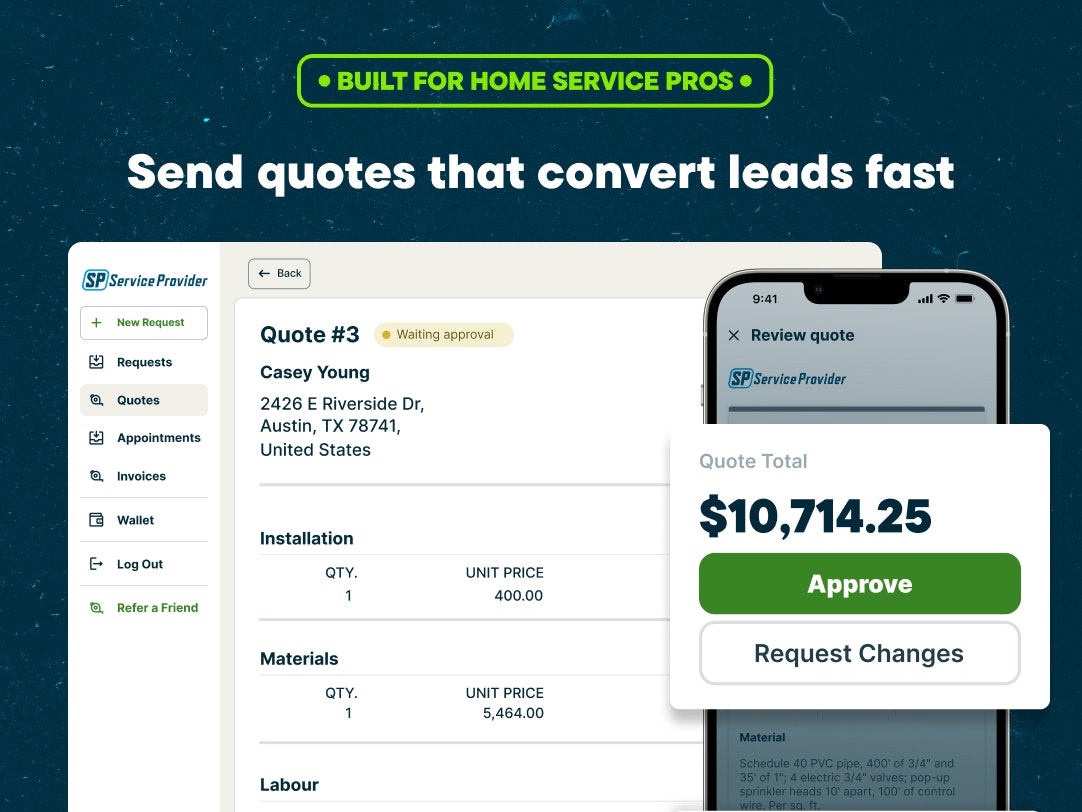
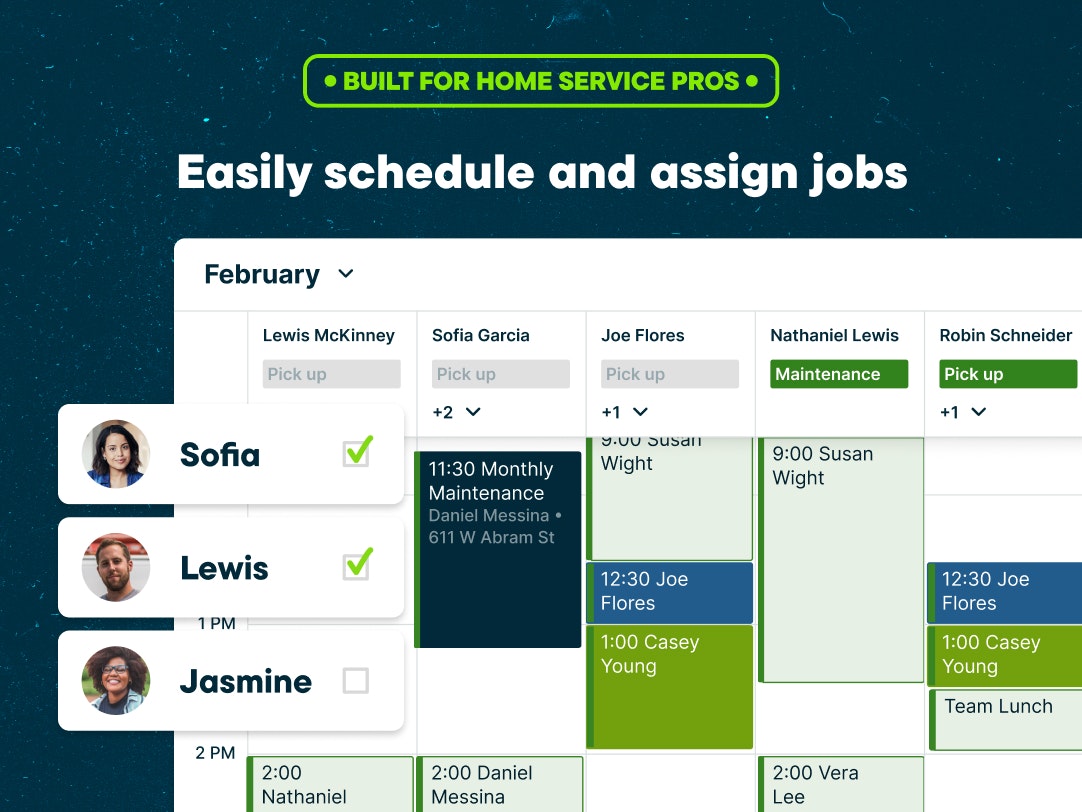
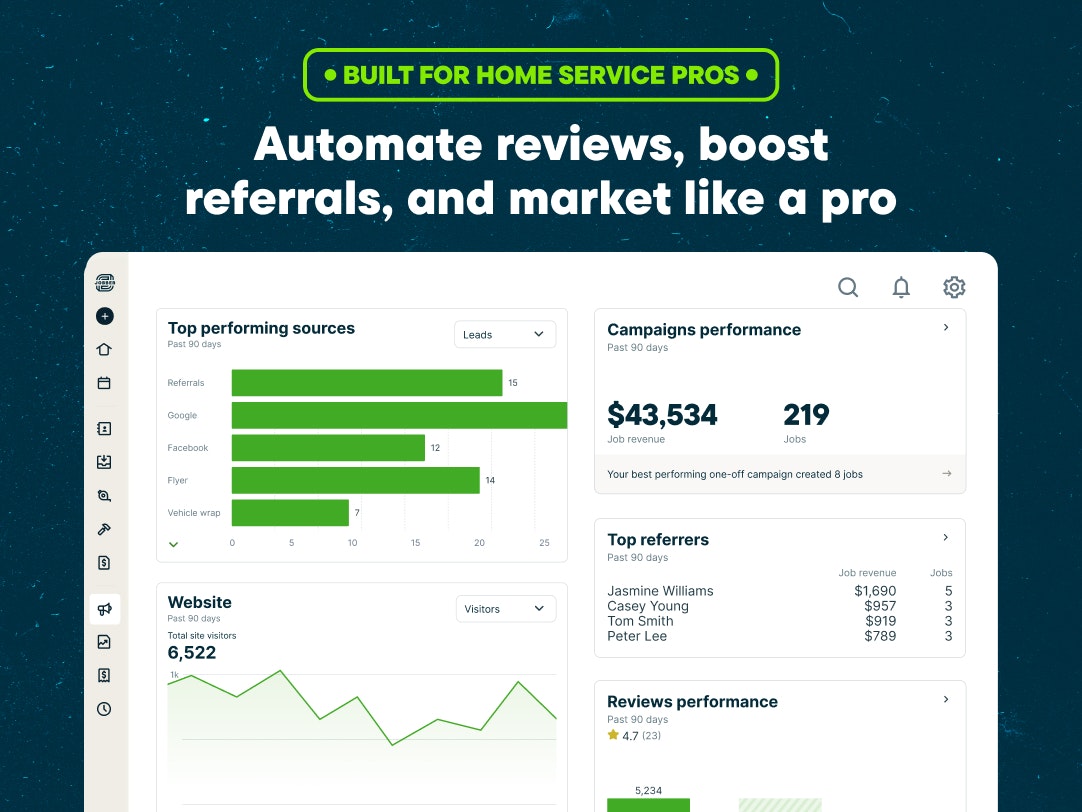
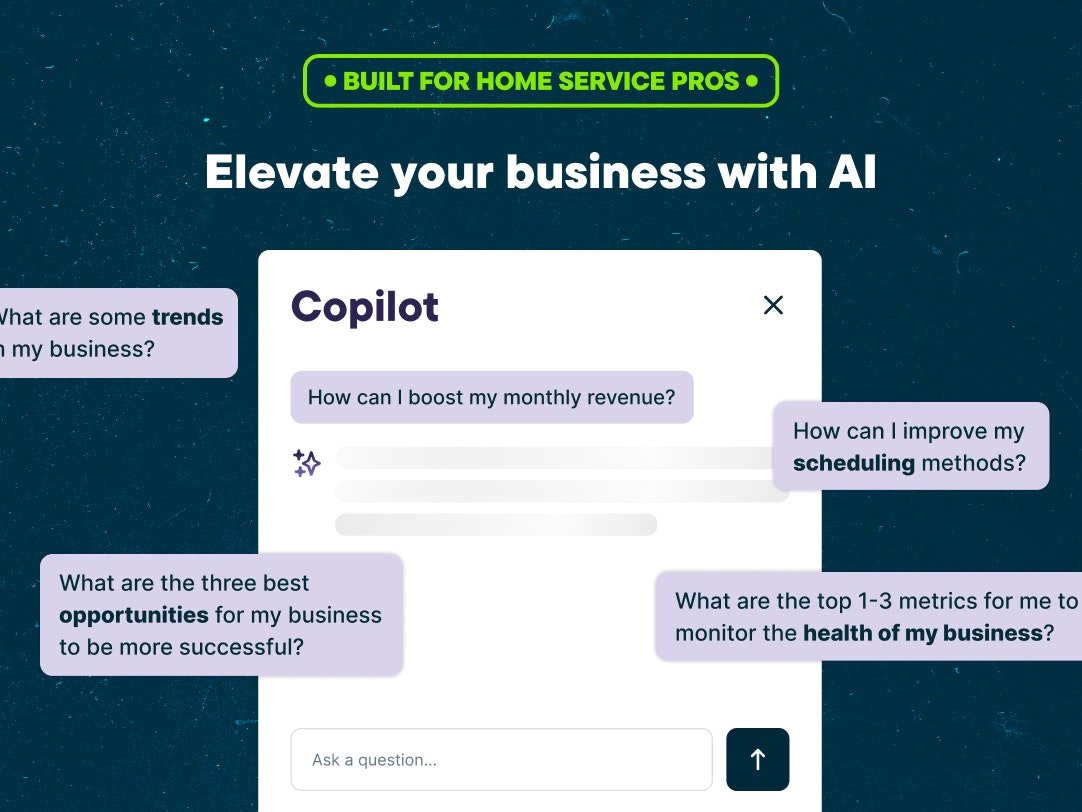
See Jobber in action
A quick look at the interface, so you know what you are getting before the trial.
What Jobber does
The areas we lean on most in daily use, and how Jobber handles each.
SC
Scheduling & dispatch
A drag-and-drop calendar and dispatch board to assign jobs, see the whole week at a glance, optimise routes and cut no-shows with automated reminders.
QU
Quoting & estimates
Build professional quotes and estimates in minutes from reusable line items and optional add-ons; customers review and approve them online, then they convert straight to jobs.
IN
Invoicing & payments
Turn finished work into an invoice with a card or ACH payment link on the spot. Jobber payments runs 2.9% + $0.30 per card and 1% for ACH, with automated reminders on overdue invoices.
CL
Client Hub
A self-serve customer portal where clients approve quotes, pay invoices, book more work and see their history, cutting the phone calls that eat a small office's day.
MO
Mobile app
One of the best-rated apps in the category, 4.8 on iOS and 4.7 on Android, that technicians actually open in the field to update status, notes and photos.
AU
Automations & QuickBooks
Automated reminders, follow-ups and a deep two-way QuickBooks Online integration (Connect tier and up) cut manual office work and double entry for busy contractors.
RE
Reporting & analytics
Built-in reports on revenue, outstanding invoices and job profitability, so you can see which jobs and clients actually make money.
ON
Online booking & website
A booking page and professional website let customers request and schedule work themselves, feeding leads straight into your pipeline.
GP
GPS & time tracking
Location and timesheet tracking (Grow tier) show where technicians and hours actually go, feeding accurate job costing and payroll.
How Jobber works day to day
In daily use, Jobber runs on a single shared job timeline. A request comes in through the online booking page or the office, becomes a quote the customer approves online, drops onto the dispatch board for a technician, and closes out as an invoice with a card or ACH payment link, often before the truck leaves the driveway. The whole team works from the same live picture, so the office and the field are never out of sync.
The scheduling and dispatch board is where dispatchers spend the day, and it is genuinely fast to drag jobs between technicians. A drag-and-drop calendar shows the whole week at a glance, automated reminders cut no-shows, and route optimisation keeps drive time down. The mobile app is a real strength, rated 4.8 on iOS and 4.7 on Android, which is why field techs adopt it quickly and update job status, notes and photos without calling the office.
Quoting and the Client Hub are where Jobber wins repeat work. You build a professional quote from reusable line items in minutes, the customer approves it online, and it converts straight into a scheduled job. The Client Hub is a self-serve customer portal where clients approve quotes, pay invoices, book more work and see their full history, which cuts down the back-and-forth phone calls that eat a small office's day.
On the money side, finished work becomes an invoice with a card or ACH payment link in a couple of taps. Jobber payments processes cards at a flat rate of 2.9% plus $0.30 and ACH at 1%, and on the Connect tier and above the two-way QuickBooks Online sync keeps the books current without double entry. Automated payment reminders chase overdue invoices on their own, which reviewers repeatedly credit for getting them paid faster.
Across Jobber reviews the pattern is consistent, and it is worth reading a spread of them before you buy. Business owners and small businesses report the same overall experience: the core features are easy to use, the mobile app gets adopted in days, and having quoting, scheduling, invoicing and client management in one system lets a small team manage more customers and track more jobs without adding office hours. Whatever your company size, reviewers weigh the monthly cost against the money Jobber helps them collect, and the most common complaint in Jobber software reviews is that the price climbs as you add users and that reporting options stay shallow for data-heavy operations.
Reporting covers the essentials: revenue, outstanding invoices and job profitability, though a business that wants to slice its numbers many ways will find it shallower than enterprise tools. There is no built-in inventory module, offline functionality is thin, and the automation and job-costing features most growing shops want sit on the higher Grow and Plus tiers, so the real monthly cost climbs faster than the $29 headline suggests.
Jobber has also leaned into AI. Its AI Receptionist can answer calls and book jobs when the office is busy, and AI-powered features help draft quotes, follow-ups and marketing copy so a small business looks bigger than it is. These features sit on the higher tiers and as paid add-ons, but they show where the platform is heading and are increasingly part of the pitch for small contractors.
The honest ceiling is size and complexity. Jobber is deliberately simple, which is why small crews love it, but a business past roughly ten to fifteen employees starts to bump into the missing inventory, the thin offline mode and the per-seat and tier costs that larger operations rely on. Bigger contractors who need that depth usually look at a heavier platform like ServiceTitan instead.
Jobber is built for home-service trades, and the reviews come from across all of them: landscaping and lawn-care crews, cleaning companies, HVAC, plumbing, roofing and electrical contractors, plus handyman, garage-door, painting, pest-control, auto-detailing and chimney-sweep businesses. More than 250,000 home-service professionals now use it, which is a big part of why the app, the integrations and the support are as polished as they are.
Beyond the core job cycle, GPS and time tracking show where technicians and hours actually go, real-time client communication and automated follow-ups keep customers in the loop, and the newer AI and Marketing Suite features help turn quotes into booked, repeat work for a growing business. Dispatching stays the daily hub, and everything updates in real time across the office and the field.
Jobber pros and cons
Pros
Genuinely easy to learn; most crews are running real jobs within a day
Top-rated mobile app (4.8 iOS, 4.7 Android) technicians actually use in the field
Clean quote to invoice to payment flow with card and ACH built in
Responsive, award-recognised customer support
100+ integrations including QuickBooks Online, Stripe and Zapier
No long contract or heavy implementation; live in days
Cons
No built-in inventory or parts management
The automation and job costing you want are gated to Grow and Plus, so cost climbs
Limited offline functionality when signal drops in the field
Starts to hit a ceiling past roughly 10 to 15 employees
Payment processing fees (2.9% + $0.30 per card) apply on every transaction
Who should use Jobber, and who should skip it
A great fit if you
You run a home-service business with 1 to 15 field staff
You run landscaping, lawn care, cleaning, HVAC or plumbing work
You want to be live in days, not months, with no big setup project
You value a fast, reliable mobile app for techs in the field
You need quoting, scheduling, invoicing and payments in one simple tool
Look elsewhere if you
You need real inventory or parts management built in
You run 20+ technicians with complex, custom workflows
You often work with no signal and need full offline mode
You want advanced marketing and CRM included without paid add-ons
Is Jobber right for your trade?
Jobber is used across the main home-service trades. Here is how it fits each one, and what its reviews tend to say in that niche.
LA
Jobber for Landscaping
Landscaping crews are one of Jobber's biggest user bases; recurring visits, route optimisation and quick mobile invoicing fit the work, which its landscaping software reviews consistently praise.
LA
Jobber for Lawn care
Lawn-care businesses use route-based scheduling and automated recurring billing to run dense weekly routes without piling on office overhead.
HV
Jobber for HVAC
HVAC contractors use Jobber for quoting, scheduling and QuickBooks-synced invoicing; its HVAC software reviews highlight the mobile app and how fast crews get live.
PL
Jobber for Plumbing
Plumbing shops use same-day quoting, dispatch and on-site card payment, the strengths that show up across its plumbing software reviews.
EL
Jobber for Electrical
Electrical contractors quote from reusable line items and take payment on site, keeping small jobs moving without paperwork.
RO
Jobber for Roofing
Roofing companies use Jobber for estimates and deposits, though very large roofing jobs may want a more specialised proposal tool.
CL
Jobber for Cleaning
Cleaning companies rely on recurring scheduling, client reminders and the self-serve Client Hub to manage repeat visits.
HA
Jobber for Handyman
Handyman businesses use Jobber's simple quote-to-invoice flow to look professional without a steep software learning curve.
GA
Jobber for Garage door
Garage-door pros quote and collect payment in a single visit using the mobile app and built-in card processing.
PA
Jobber for Painting
Painting businesses build detailed quotes and follow up automatically to win repeat and referral work.
PE
Jobber for Pest control
Pest control operators use recurring plans and route scheduling, though dedicated pest platforms go deeper on chemical tracking.
AU
Jobber for Auto detailing
Mobile auto-detailing businesses use online booking and instant invoicing to run appointment-based work straight from a phone.
CH
Jobber for Chimney sweep
Chimney-sweep and fireplace businesses use scheduling, reminders and quick invoicing to manage seasonal recurring work.
Jobber scorecard
How Jobber scored across our rubric. Every tool is measured on the same areas.
Mobile app 9.3
Ease of use 9.2
Value for money 8.4
Invoicing & payments 9
Reporting & analytics 7.5
Scheduling & dispatch 9
Jobber pricing and plans
Real starting prices, dated and re-checked each pass. Prices shown are per month on annual billing (the regular rate). Month-to-month is higher; Core is $49/mo. Core includes 1 user, Connect up to 5, Grow up to 10 and Plus 15; additional users are $29/mo each. Payment processing is 2.9% + $0.30 per card and 1% for ACH, and the Marketing Suite add-on is $79/mo.
Solo
Core
$29/mo
1 user included
Online booking and quoting
Scheduling and invoicing
Card and ACH payments
100+ integrations, client hub and reporting
Most popular
Connect
$99/mo
Up to 5 users
Everything in Core
Automated reminders and payments
QuickBooks Online sync
Job forms, checklists, time and expense tracking
Scaling
Grow
$149/mo
Up to 10 users
Everything in Connect
Job costing and GPS time tracking
Two-way text messaging
Quote add-ons, upsells and custom automation
Advanced
Plus
$399/mo
15 users included
Everything in Grow
Pipeline CRM and Marketing Suite
AI Receptionist
Dedicated onboarding and premium support
Jobber integrations
Tools Jobber connects with out of the box, so it fits the stack you already run.
QuickBooks OnlineStripeZapierGoogle CalendarCompanyCamMailchimpSquareGustoNiceJobGoogle Local Services AdsThumbtackDocuSign
Support, training and deployment
How you can reach the Jobber team, how they onboard you, and where it runs.
Support
Email / Help Desk
Phone Support
Chat
Knowledge Base
FAQs / Forum
Training
Live Online
Webinars
Documentation
Videos
Deployment
Cloud, SaaS, Web-Based
Mobile - Android
Mobile - iPhone / iPad
Typical customers
Freelancers
Small businesses
Mid-size businesses
Jobber alternatives
If Jobber is not the fit, these are the closest tools we rank, in order.
Housecall ProThe consumer-friendly all-in-one for home service
Every tool demos well. These are the checks that actually tell you whether Jobber fits your shop, while the free trial is still running.
Run a real job end to end
Book it, schedule it, dispatch a tech, then invoice and take payment
Do it on the phone your techs actually carry, not a demo laptop
Try it with weak signal in the field, not just on office wifi
Add a second user and watch how the per-seat price moves
Watch for the catch
Payment-processing fees taken on every card and ACH run
Features quietly locked to a higher tier than the one you tried
Onboarding or data import sold as a paid add-on
How hard it is to export your data if you decide to leave
Jobber FAQ
How much does Jobber cost?
Jobber costs $29 per month for the Core plan on annual billing (1 user). Connect is $99/mo (up to 5 users), Grow is $149/mo (up to 10) and Plus is $399/mo (15 users). Month-to-month pricing is higher, Core is $49/mo, and additional users are $29/mo each.
Does Jobber have a free trial?
Yes. Jobber offers a 14-day free trial of the Grow plan with no credit card required, so you can test scheduling, quoting, invoicing and the mobile app on real jobs. There is no permanent free plan.
Is Jobber worth it?
For most small home-service businesses, yes. Jobber replaces paper, spreadsheets and separate invoicing tools with one system you can run in days, and reviewers consistently say it pays for itself by getting them paid faster and cutting no-shows. It is less worth it if you need built-in inventory or run 20+ technicians with complex workflows.
Is Jobber good for landscaping and lawn care businesses?
Yes. Landscaping and lawn-care crews are among Jobber's largest customer groups. Recurring visits, route-based scheduling, online booking and quick mobile invoicing map neatly onto how a lawn-care route runs, which is why it is one of the most recommended tools for the trade.
Jobber vs Housecall Pro: which should I choose?
Both are top field service platforms for small home-service shops. Jobber is usually rated stronger on quoting, the Client Hub customer portal and ease of use, while Housecall Pro leans harder into consumer-style marketing and dispatching. If your priority is a clean quote-to-invoice flow and a great mobile app, Jobber tends to win; compare them side by side before you commit.
Jobber vs ServiceTitan: which is right for me?
They target different sizes of business. Jobber is built for small home-service crews of 1 to 15 and is the right fit if you want to be live in days at a predictable price. ServiceTitan is an enterprise field service platform for larger HVAC, plumbing and electrical contractors, with deeper features but a much higher cost and a longer implementation. Most small contractors find Jobber is the better fit, and only move to a ServiceTitan-class platform once they outgrow it.
Does Jobber have a mobile app?
Yes, and it is a standout. The Jobber mobile app is rated 4.8 on iOS and 4.7 on Android, and technicians use it to see their schedule, update job status, add notes and photos, and take payment in the field. Owners get a matching app to run the business on the go.
What are Jobber's payment processing fees?
Jobber payments charges 2.9% + $0.30 per credit or debit card transaction, 2.7% + $0.30 for Tap to Pay, and 1% for ACH bank payments. These apply on every transaction processed through Jobber, so factor them into your pricing.
Is Jobber good for a small business?
Yes. Jobber is built specifically for small home-service businesses, typically 1 to 15 field staff, and is designed to get a small crew live in days without a long implementation or contract. More than 250,000 professionals use it.
Does Jobber integrate with QuickBooks?
Yes. Jobber syncs two-way with QuickBooks Online on the Connect tier and above, alongside 100+ other apps through its App Marketplace and Zapier, including Stripe, CompanyCam, Mailchimp and Google Local Services Ads.
What is the difference between Jobber's Core, Connect, Grow and Plus plans?
Core covers the basics for a solo operator: booking, quoting, scheduling, invoicing and payments. Connect adds automation and QuickBooks sync for a small team. Grow adds job costing, GPS time tracking, two-way texting and upsells. Plus adds Pipeline CRM, Marketing Suite, AI Receptionist and dedicated onboarding for larger shops.
How many businesses use Jobber?
More than 250,000 home-service professionals use Jobber. Founded in 2011 and based in Edmonton, Canada, it is one of the most widely used field service management platforms for small businesses.
What are Jobber's main limitations?
The most common ones reviewers cite are no built-in inventory management, limited offline functionality when signal drops, and the strongest automation and job-costing features being gated to the higher Grow and Plus tiers, which raises the real cost as you grow.
Jobber reviews from real users
Verified reviews from people running Jobber in the field. Every review is read by our team before it goes live, so this is honest signal, not spam.
4.0/ 5★★★★☆Based on 7 user reviews71% would recommendWrite a review
Who uses Jobber?By company size, from 7 verified reviews
2-10 employees43%
11-50 employees29%
51-200 employees14%
Just me14%
+ What reviewers like
The scheduling and mobile app genuinely work well.
Fast mobile app, dead simple invoicing, and my techs actually adopted it in a day.
Real-time crew visibility and same-day quoting is a game changer.
Excellent scheduling board and reliable two-way sync across devices.
− What could be better
Support was slow on a billing bug that actually cost us money.
Reporting is a little shallow if you want to slice numbers a dozen ways.
Onboarding a big price book took a weekend.
Gets pricey as the team grows; some features sit on the top tier.
PR
Priya NairOwner11-50 employees
★★☆☆☆
Great tool, but support left us hanging
The software itself is fine and the crew likes the app. My problem was support. We hit a billing sync bug that double-charged two clients and it took over a week and three follow-ups to get a straight answer. For something touching money, that is not good enough.
Pros
The scheduling and mobile app genuinely work well.
Cons
Support was slow on a billing bug that actually cost us money.
Jul 26, 2026
DA
Dave ThorntonOwner2-10 employees
★★★★★
Runs my whole HVAC shop now
We moved off spreadsheets and a whiteboard last spring, and dispatch is genuinely night and day. The crew can see their day, mark jobs done, and the invoice is out before they leave the driveway. Onboarding took a weekend, not a month.
Pros
Fast mobile app, dead simple invoicing, and my techs actually adopted it in a day.
Cons
Reporting is a little shallow if you want to slice numbers a dozen ways.
Jul 23, 2026Recommends Jobber
MA
Marcus WebbOperations manager2-10 employees
★★★★★
Best decision we made for the plumbing crew
We run six trucks and this keeps the whole day straight without me babysitting a whiteboard. Quotes go out same day, invoices are automatic, and I can see where everyone is. It paid for itself in the first month just from jobs we stopped losing track of.
Pros
Real-time crew visibility and same-day quoting is a game changer.
Cons
Onboarding a big price book took a weekend.
Jul 20, 2026Recommends Jobber
MA
Maria SandovalOperations manager11-50 employees
★★★★☆
Solid platform, just watch the per-seat cost
Scheduling and client communication got noticeably better once we standardized on it. The board view is the part my dispatchers live in. Only real gripe is that the monthly cost climbs quickly once you add seats for a bigger crew.
Pros
Excellent scheduling board and reliable two-way sync across devices.
Cons
Gets pricey as the team grows; some features sit on the top tier.
Jul 17, 2026Recommends Jobber
CA
Carlos ReyesField technician2-10 employees
★★★★★
The one app I actually open in the field
I am not a software person. This is the first tool I do not fight with. It loads even when I have one bar of signal behind a house, and that is what matters to me.
Pros
Loads fast on weak signal and the job details are right where I expect them.
Jul 11, 2026Recommends Jobber
JE
Jenna ParkDispatcher51-200 employees
★★★☆☆
Fine for the basics, reporting is thin
For booking, dispatch, and getting paid it does the job and the team picked it up fast. Where it falls short for us is analytics. Building the custom reports our office needs is limited, and exporting the data out is clunkier than it should be.
Pros
Easy to learn and a clean dispatch view.
Cons
Custom reporting is limited and data export feels like an afterthought.
Jul 2, 2026
TO
Tom BeckerOffice admin / CSRJust me
★★★★☆
Invoicing and payments just work
Running the office solo, the part I care about is turning finished work into money without chasing anyone. Quote to invoice to paid is smooth, and clients seem to find the payment link easy.
Pros
Quote to payment flow is smooth and customers rarely get confused.
Cons
Wish the client portal was more customizable to our brand.
Jun 25, 2026Recommends Jobber
Have you used Jobber?
You need a free account to post a review. Create one in under a minute and you will come right back here to write it.
Marko Ristic is the founder of Duhari and the person behind every review and calculator on the site. He has spent close to a decade building, running and growing content-driven websites in both English and Serbian, and holds an MBA in Engineering Management from the University of Novi Sad.
That operator background is the whole reason Duhari exists: he got tired of watching small businesses get sold software by whoever had the biggest ad budget, then lose months to a tool their crew would never open. So he built the opposite.
Every platform here is tested hands-on, set up the way a real shop would, and run through a full week of field-service work before it is scored on the public 40-point rubric. He writes the rankings himself, names a clear pick, and never lets a commission move a score.
Independently researchedWritten by an operatorNo sponsored content
Hands-on, not sponsoredA real week of jobs on a standard account, never a guided demo.
One 40-point rubricThe same scale for every tool, so the numbers are comparable.
Zero pay-to-rankNo vendor can buy a rank, a score or an award.
“We run a real week of jobs through every tool and score it against the same 40 points. If it wins, it earned it, and no vendor can change that.”
The Duhari review team
1
Independent, not sponsoredNo vendor accounts, no special treatment
2
A real week of jobsRun through actual field work, not a demo
3
Scored on 40 pointsThe same rubric for every single tool
Independent, not vendor-owned. No pay-to-rank placements, real starting prices, and hands-on scores, unlike the big directories.See our full methodology →
Not sure which tool fits?
Start from the full ranking, filtered by your trade and crew size, and pick the right tool with honest scores and real starting prices.

 QuickBooks Online
 Stripe
 Zapier
 Google Calendar
 CompanyCam
 Mailchimp
 Square
 Gusto
Gusto NiceJob
 Google Local Services Ads
 Thumbtack
 DocuSign


