
FieldEdge Review
FieldEdge is a field-service platform for HVAC, plumbing and electrical contractors, built around a deep QuickBooks integration, and this FieldEdge review weighs the pricing, features and what verified FieldEdge reviews say, so a service business already on QuickBooks can decide whether it fits.
On this page
The verdict
FieldEdge is a well-established, QuickBooks-first field-service platform for the trades, and its reputation rests on two things: a strong dispatch board and one of the deepest QuickBooks integrations in the category. Built on decades of dESCO service-software heritage, now offered as FieldEdge by Xplor and headquartered in Atlanta, it holds a solid 4.2 on Capterra from around 310 reviews, with especially high marks for its responsive support team.
Where FieldEdge fits is a small HVAC, plumbing or electrical business that runs its books in QuickBooks and wants scheduling, a skill-and-location-aware dispatch board, mobile invoicing, service agreements and flat-rate pricing tied tightly to accounting. The QuickBooks sync is the headline: reviewers say it eliminates double entry and saves serious back-office time, which is the main reason QuickBooks shops choose it.
The trade-offs are stability and interface age. FieldEdge reviews consistently flag recurring bugs and glitches and a dated desktop interface, value and features both sit at 3.9, and there is no free trial, with sales-gated pricing and setup fees. For a QuickBooks-based trades contractor who values the integration and dispatch, though, FieldEdge is worth a demo and a genuine contender.
FieldEdge at a glance
| Vendor | FieldEdge (Xplor) | Category | Field service management |
|---|---|---|---|
| Best for | established HVAC, plumbing and electrical shops | Starting price | Quote (~$100-125/user/mo) |
| Free trial | Demo only | Free plan | No |
| User rating | 4.2/5 (310 reviews) | Our score | 8.1/10 |
| Deployment | Cloud, iOS, Android | Founded | 2014 |
| Headquarters | Atlanta, Georgia, USA | Users | – |
See FieldEdge in action
A quick look at the interface, so you know what you are getting before the trial.
What FieldEdge does
The areas we lean on most in daily use, and how FieldEdge handles each.
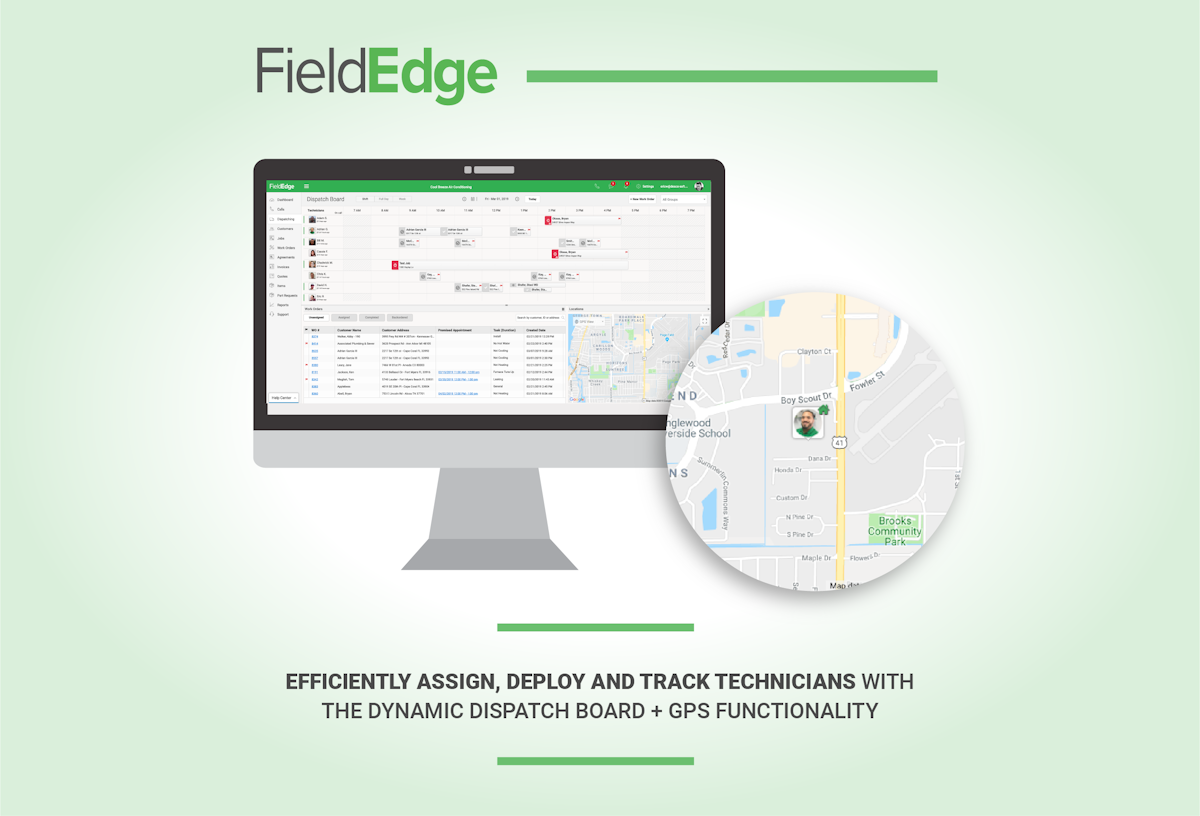
Skill-based dispatch board
Its strength. Suggests work-order assignments by a technician's skill set and expected location, keeping a multi-truck operation moving.
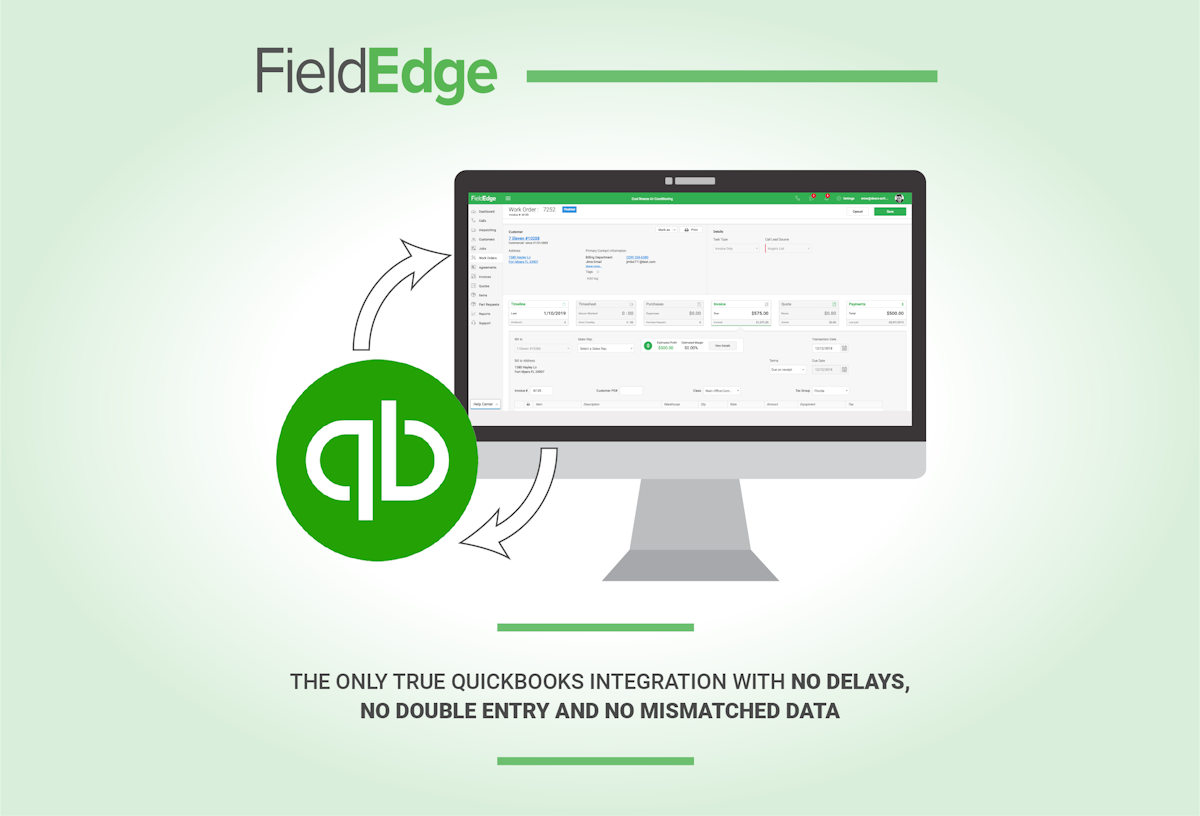
Deep QuickBooks integration
The headline: syncs customers, invoices and payments with QuickBooks and eliminates double entry, saving real back-office time.
Native mobile app
Technicians access items, tasks, services, materials and customer history on the go, and invoice and take payment from the field.
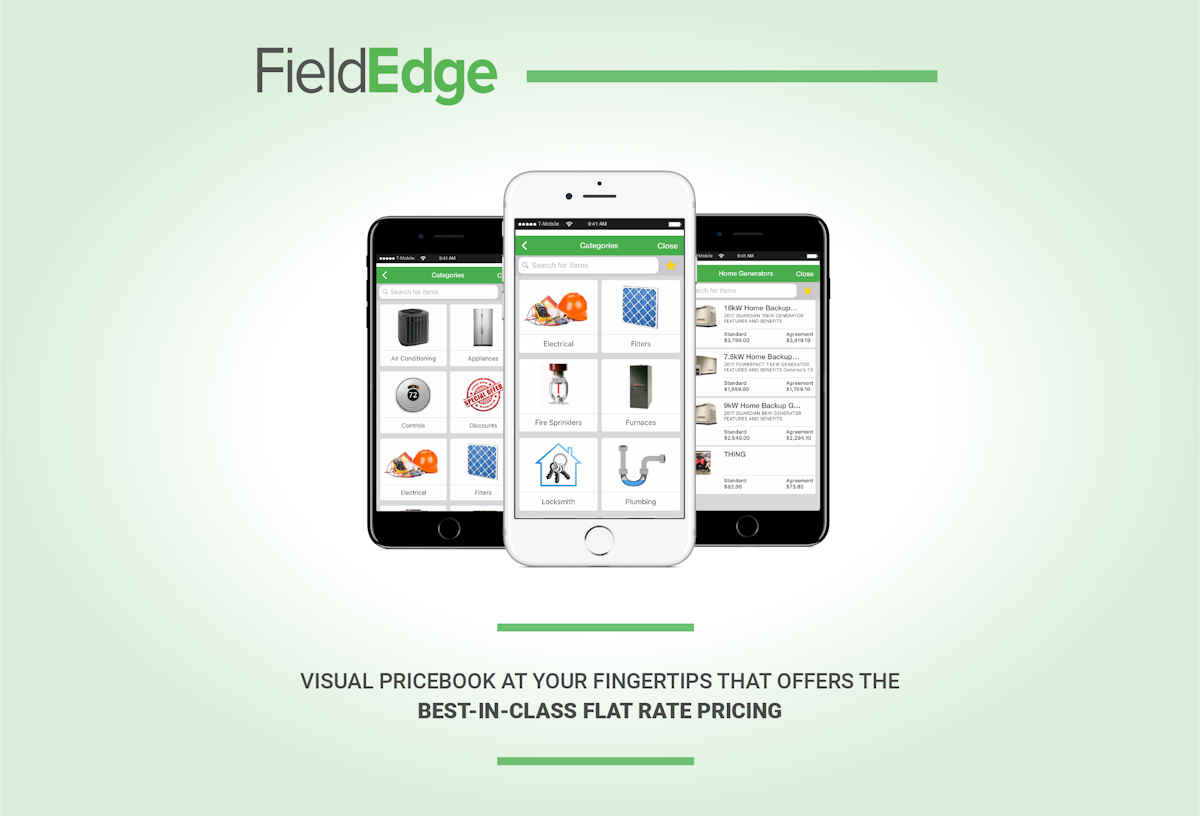
Flat-rate pricing & presentation
Present branded good-better-best flat-rate options in the home to lift average ticket size and close rates.
Service agreements
Create and manage maintenance and service agreements to build the recurring revenue base of a trades business.
Scheduling & customer history
Schedule jobs and keep full customer and equipment history so a returning visit carries its context.
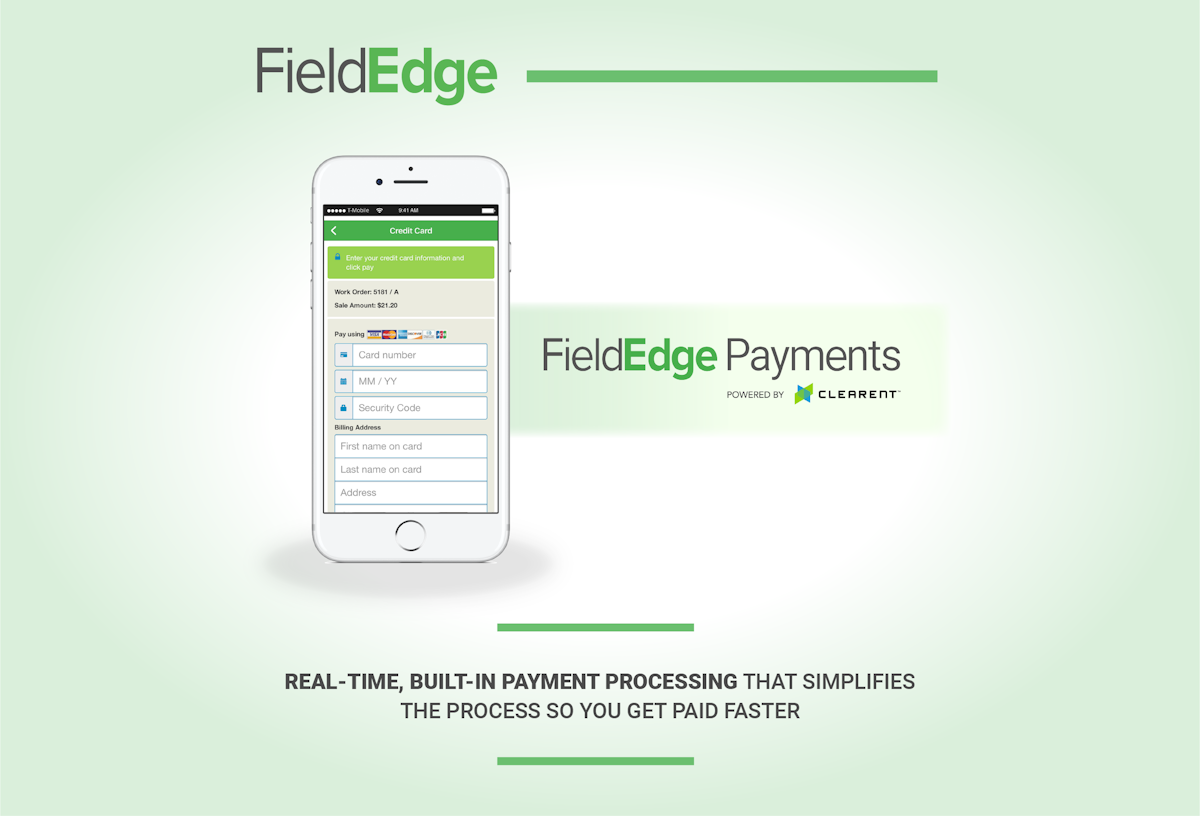
Invoicing & payments
Invoice on site and collect payment, with billing flowing straight into QuickBooks without re-keying.
Reporting & analytics
Customisable reports and analytics give owners visibility into technicians, jobs and revenue.
How FieldEdge works day to day
In daily use, FieldEdge runs a trades business from the dispatch board to the books. A call is logged against the customer, a job is scheduled and assigned on a dispatch board that suggests the right technician by skill and location, the tech works it from a native mobile app with access to items, tasks, services and materials, presents flat-rate pricing, invoices and takes payment, and the whole thing syncs to QuickBooks. For a QuickBooks shop, that closed loop from field to accounting is the point.
The dispatch board is a genuine strength. FieldEdge suggests work-order assignments based on a technician's skill set and expected location at the time of the job, which reviewers rate highly, and the office gets a clear, visual view of the day that keeps a multi-truck HVAC or plumbing operation moving.
The QuickBooks integration is the headline feature. FieldEdge syncs customers, invoices and payments with QuickBooks and eliminates the double entry that plagues shops using a disconnected tool, with reviewers reporting it saves substantial back-office time each week. For a business already committed to QuickBooks, this depth is hard to match elsewhere.
The mobile app carries the field. Technicians access their items, tasks, services and materials on the go, see customer history, present good-better-best flat-rate options, capture signatures and collect payment, so a visit is completed and billed without paper and without a second trip.
Sales and recurring revenue are covered. Flat-rate pricing, price presentation and service-agreement management help a contractor sell more per visit and build the recurring maintenance base that stabilises a trades business, alongside reporting and analytics for the owner.
FieldEdge is built specifically for HVAC and plumbing contractors, plus electrical and adjacent home-service trades, and covers customer service, scheduling and dispatch, invoicing, service-agreement creation, customer-history tracking, and customized reports and analytics. The seamless QuickBooks integration ties invoicing and payment tracking to the books in real time, which is why HVAC and plumbing contractors already on QuickBooks are its core buyers.
Across FieldEdge reviews the pattern is positive but qualified. Sentiment runs about 79 percent positive, with the dispatch, scheduling and especially the support team praised, but a meaningful share of negative reviews cite recurring technical bugs and glitches, and some describe a dated desktop interface and inconsistent support after implementation. It is a capable platform with real rough edges.
The honest ceiling is polish and platform age. FieldEdge is powerful where it counts, dispatch and QuickBooks, but the stability complaints and older interface are real, value and features both rate 3.9, and there is no free trial, so a buyer should demo it hard and weigh the bugs against the integration. A business not tied to QuickBooks loses much of its advantage.
FieldEdge is built for the home-service trades, and its users are overwhelmingly small businesses in them: HVAC and refrigeration, plumbing, electrical, and adjacent contractors like garage-door and appliance-repair shops. Any small service business running QuickBooks that wants tighter dispatch and billing is the natural fit.
Compared with newer platforms, FieldEdge trades modern polish for QuickBooks depth and a proven dispatch board. It does not have the slick interface of a Housecall Pro or the enterprise breadth of a ServiceTitan; instead it does QuickBooks-connected scheduling, dispatch and billing for small trades shops, which is exactly why QuickBooks-based HVAC and plumbing contractors keep choosing it.
FieldEdge pros and cons
Pros
- Strong, skill-and-location-aware dispatch board
- One of the deepest QuickBooks integrations in the category
- Highly rated, responsive support team (4.4 on Capterra)
- Flat-rate pricing, service agreements and mobile payments
- Proven, established platform with decades of heritage
Cons
- Recurring bugs and glitches cited in reviews
- Dated desktop interface versus newer tools
- No free trial; sales-gated pricing plus setup fees
- Value and features both rate 3.9 on Capterra
- Loses much of its edge if you are not on QuickBooks
Who should use FieldEdge, and who should skip it
A great fit if you
- You run a small HVAC, plumbing or electrical business
- Your accounting already lives in QuickBooks
- You want a strong, skill-based dispatch board
- You value flat-rate pricing and service agreements
- You want mobile invoicing and field payments
Look elsewhere if you
- You are not committed to QuickBooks
- You want a modern, highly polished interface
- You need a free trial before committing
- You cannot tolerate occasional bugs and glitches
Is FieldEdge right for your trade?
FieldEdge is used across the main home-service trades. Here is how it fits each one, and what its reviews tend to say in that niche.
FieldEdge for HVAC
HVAC is FieldEdge's core: skill-based dispatch, flat-rate pricing, service agreements and QuickBooks-synced billing for heating and cooling.
FieldEdge for Plumbing
Plumbing contractors run scheduling, dispatch and mobile invoicing with the accounting flowing straight into QuickBooks.
FieldEdge for Electrical
Electrical businesses present flat-rate options in the field and keep customer and equipment history in one place.
FieldEdge for Refrigeration
Refrigeration and mechanical service teams use the dispatch board and service agreements for recurring maintenance.
FieldEdge for Garage door
Garage-door companies schedule, dispatch and invoice jobs and collect payment from the technician's mobile app.
FieldEdge for Appliance repair
Appliance-repair shops track parts, tasks and history per job and bill without double entry into QuickBooks.
FieldEdge for Mechanical
Mechanical contractors manage recurring service contracts and flat-rate pricing across a multi-technician team.
FieldEdge for Home services
Small home-service businesses on QuickBooks use FieldEdge to tighten dispatch, invoicing and the office-to-field loop.
FieldEdge scorecard
How FieldEdge scored across our rubric. Every tool is measured on the same areas.
FieldEdge pricing and plans
Real starting prices, dated and re-checked each pass. FieldEdge uses quote-based, per-user pricing across three tiers, Select, Premier and Elite, with figures commonly cited around 100 to 125 dollars per user per month plus setup fees of roughly 500 to 2,000 dollars. There is no free trial; pricing is sales-gated. Confirm current per-user rates directly with FieldEdge.
- Scheduling & dispatch board
- Customer management
- Mobile app & invoicing
- QuickBooks integration
- Everything in Select
- Flat-rate pricing
- Service agreements
- Reporting & analytics
- Everything in Premier
- Advanced features
- Priority support
- Higher usage
FieldEdge integrations
Tools FieldEdge connects with out of the box, so it fits the stack you already run.
 QuickBooks Online
QuickBooks Desktop
QuickBooks Enterprise
QuickBooks Online Advanced
QuickBooks Online
QuickBooks Desktop
QuickBooks Enterprise
QuickBooks Online Advanced
 Podium
 Zapier
Support, training and deployment
How you can reach the FieldEdge team, how they onboard you, and where it runs.
Support
- Email / Help Desk
- Phone Support
- Chat
- Knowledge Base
Training
- Live Online
- Webinars
- Documentation
- Videos
Deployment
- Cloud, SaaS, Web-Based
- Mobile - Android
- Mobile - iPhone / iPad
Typical customers
- Small businesses
- Mid-size businesses
- Enterprises
FieldEdge alternatives
If FieldEdge is not the fit, these are the closest tools we rank, in order.




How to test FieldEdge before you commit
Every tool demos well. These are the checks that actually tell you whether FieldEdge fits your shop, while the free trial is still running.
Run a real job end to end
- Book it, schedule it, dispatch a tech, then invoice and take payment
- Do it on the phone your techs actually carry, not a demo laptop
- Try it with weak signal in the field, not just on office wifi
- Add a second user and watch how the per-seat price moves
Watch for the catch
- Payment-processing fees taken on every card and ACH run
- Features quietly locked to a higher tier than the one you tried
- Onboarding or data import sold as a paid add-on
- How hard it is to export your data if you decide to leave
FieldEdge FAQ
How much does FieldEdge cost?
FieldEdge uses quote-based, per-user pricing across three tiers, Select, Premier and Elite, with figures commonly cited around 100 to 125 dollars per user per month plus setup fees of roughly 500 to 2,000 dollars. There is no free trial and pricing is sales-gated, so confirm current per-user rates directly with FieldEdge.
What do FieldEdge reviews say?
FieldEdge holds a 4.2 out of 5 on Capterra from around 310 reviews, with about 79 percent positive sentiment. Reviewers praise the dispatch and scheduling and especially the responsive support team, but a meaningful share flag recurring bugs and glitches and a dated desktop interface. Its lowest sub-scores are features and value, both 3.9.
Does FieldEdge integrate with QuickBooks?
Yes, and it is its headline strength. FieldEdge syncs customers, invoices and payments with QuickBooks and eliminates double entry, which reviewers say saves substantial back-office time each week. For a business already on QuickBooks, this depth is the main reason to choose FieldEdge.
Is FieldEdge good for HVAC?
Yes, HVAC is its core market. FieldEdge was built for HVAC, plumbing and electrical contractors, with a skill-and-location-aware dispatch board, flat-rate pricing, service agreements and QuickBooks-synced billing tuned to how a heating-and-cooling business runs.
Does FieldEdge have a free trial?
No. FieldEdge does not offer a free trial. It is sold through a guided demo and a sales-gated quote, with setup fees, reflecting its positioning as an established platform for committed small trades businesses rather than a self-service signup.
Is FieldEdge worth it?
For a small HVAC, plumbing or electrical business that runs on QuickBooks and wants a strong dispatch board and tight billing integration, yes, it is a genuine contender. It is less worth it for a business not on QuickBooks, or one that cannot tolerate the occasional bugs and a dated interface reviewers report.
Who makes FieldEdge?
FieldEdge is offered as FieldEdge by Xplor, built on decades of service-software heritage from dESCO, and is headquartered in Atlanta, Georgia. That long lineage is why it has a mature dispatch and QuickBooks feature set, even as reviewers note the interface feels dated.
What are FieldEdge's main downsides?
The most common ones in FieldEdge reviews are recurring bugs and glitches, a dated desktop interface, no free trial with sales-gated pricing and setup fees, and features and value both rating 3.9. Its edge also depends heavily on using QuickBooks.
Does FieldEdge have a mobile app?
Yes. FieldEdge has a native mobile app that lets technicians access their items, tasks, services and materials, see customer history, present flat-rate pricing, capture signatures and collect payment in the field, then sync everything back to the office and QuickBooks.
How does FieldEdge compare to Housecall Pro or ServiceTitan?
Housecall Pro is more modern and easier for small shops, and ServiceTitan is the deeper enterprise platform, while FieldEdge sits in between with its standout QuickBooks integration and dispatch board. FieldEdge wins for QuickBooks-based trades that value that integration; the others win on polish or enterprise depth.
FieldEdge reviews from real users
Verified reviews from people running FieldEdge in the field. Every review is read by our team before it goes live, so this is honest signal, not spam.
No user reviews yet. If you use FieldEdge, be the first to tell other shops how it works in the real world.
You need a free account to post a review. Create one in under a minute and you will come right back here to write it.
Why our ranking is worth trusting
“We run a real week of jobs through every tool and score it against the same 40 points. If it wins, it earned it, and no vendor can change that.”
The Duhari review teamNot sure which tool fits?
Start from the full ranking, filtered by your trade and crew size, and pick the right tool with honest scores and real starting prices.