
FieldPulse Review
FieldPulse is a broad, affordable all-in-one field service management platform used across the trades, and this FieldPulse review weighs the pricing, features and what verified FieldPulse reviews say, so a growing service or contractor team can decide whether it fits.
On this page
The verdict
FieldPulse earns a 4.6 out of 5 from more than 480 verified reviews, one of the larger review bases in this roundup, with its strongest marks for customer support (4.7) and its sheer feature breadth. It covers the whole job for a service business, from customer management, scheduling and dispatch through estimates, a flat-rate pricebook, invoicing and payments, with inventory, multi-location management and an open API for teams that are growing past a basic tool.
Where FieldPulse separates itself is how much it packs in for the price. It reaches into areas, flat-rate pricebook, lead management, inventory, advanced reporting and multi-location, that usually cost far more elsewhere, which is why reviewers keep calling it an affordable all-in-one. Founded in 2015 in Dallas and now serving around 10,000 businesses, it has grown by giving small and mid-size teams a lot of platform for the money.
The trade-offs are the ones a broad, fast-moving platform brings. A few features are not as deep as a specialist tool, reviewers mention the occasional sync issue or bug, and pricing is sales-led rather than a public headline, so you talk to sales for a quote. For a growing HVAC, plumbing, electrical or other service business that wants breadth and strong support without an enterprise price, though, FieldPulse is one of the best-value all-in-ones on the market. FieldPulse offers a free trial and a guided demo, so you can test it before you commit.
FieldPulse at a glance
| Vendor | FieldPulse | Category | Field service management |
|---|---|---|---|
| Best for | small to mid-size home-service and contractor teams | Starting price | Custom quote |
| Free trial | Yes | Free plan | No |
| User rating | 4.6/5 (481 reviews) | Our score | 8.6/10 |
| Deployment | Cloud, iOS, Android | Founded | 2015 |
| Headquarters | Dallas, USA | Users | 10,000+ |
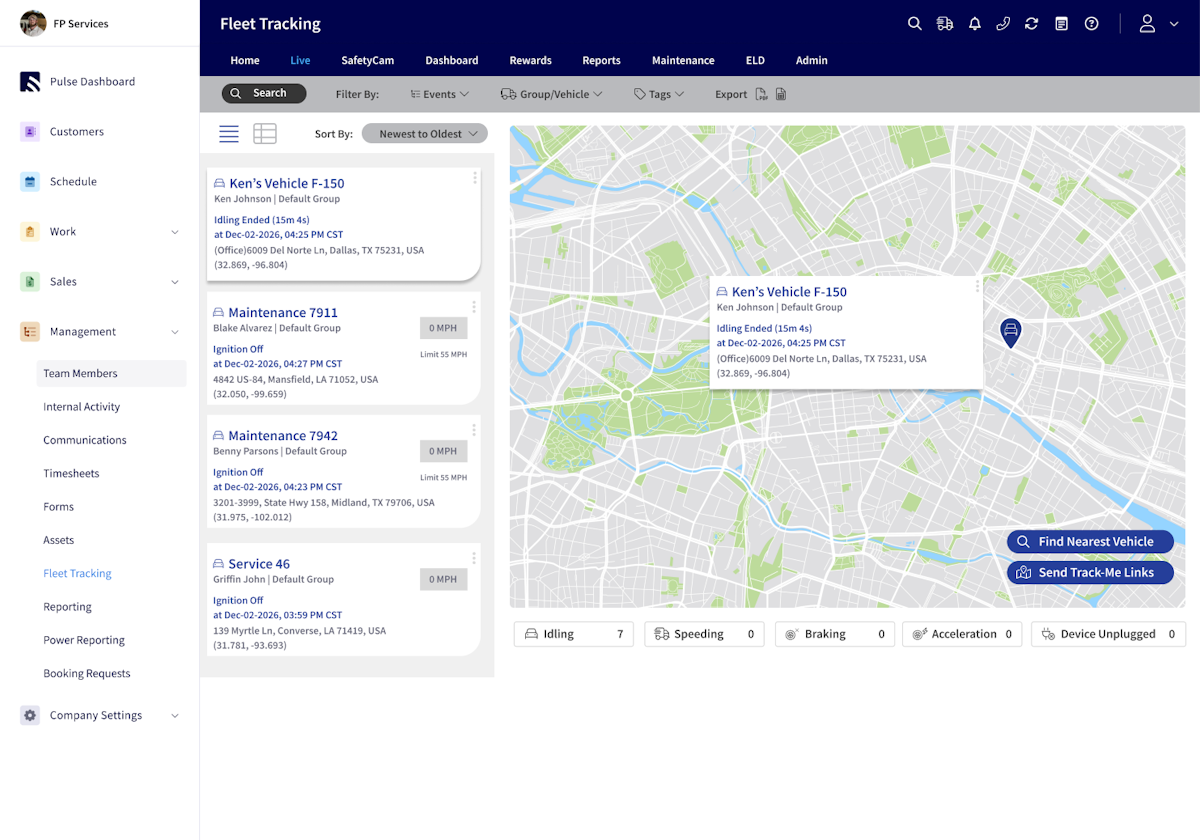
See FieldPulse in action
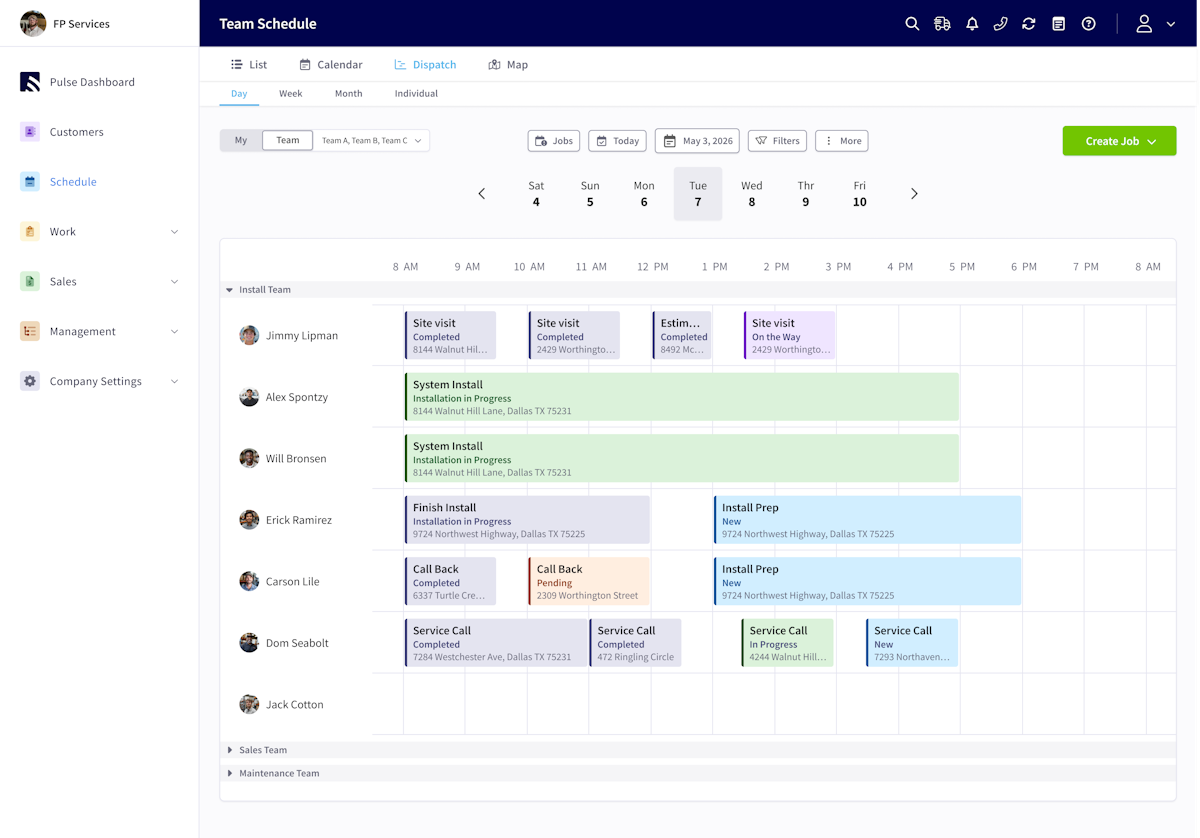
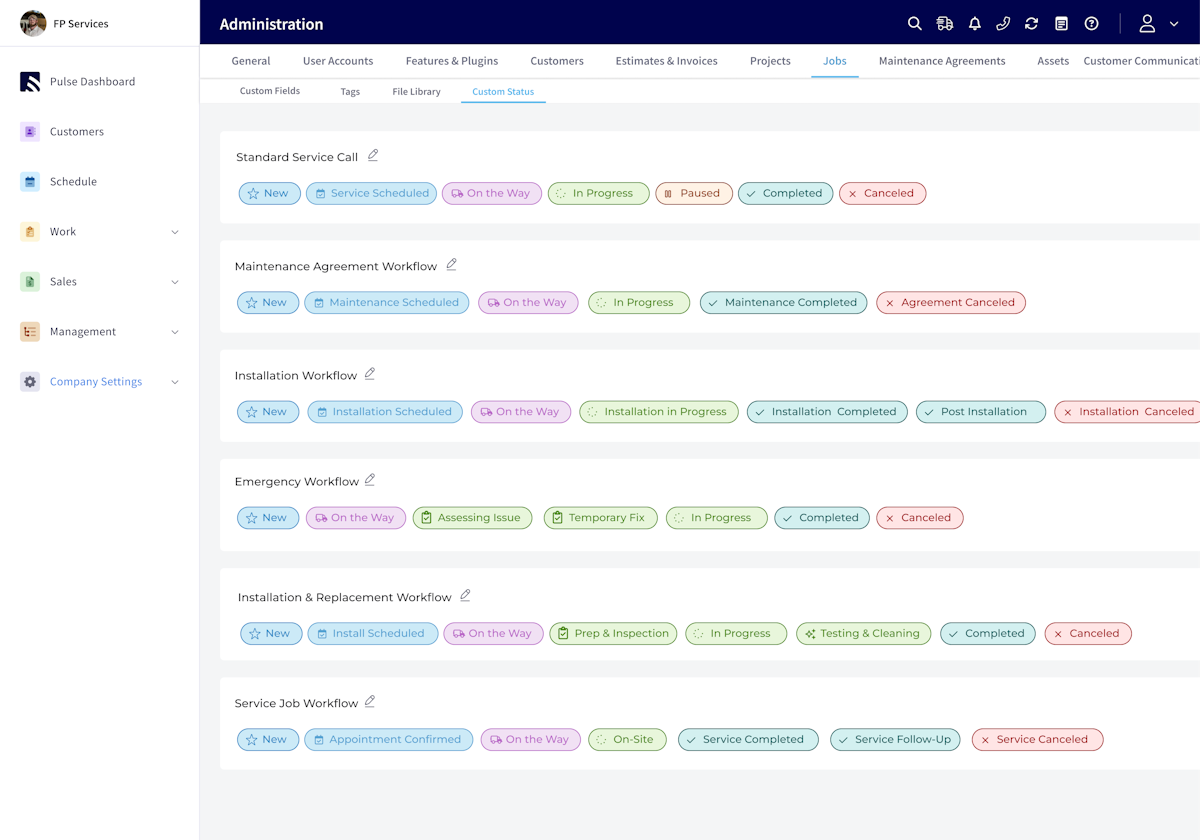
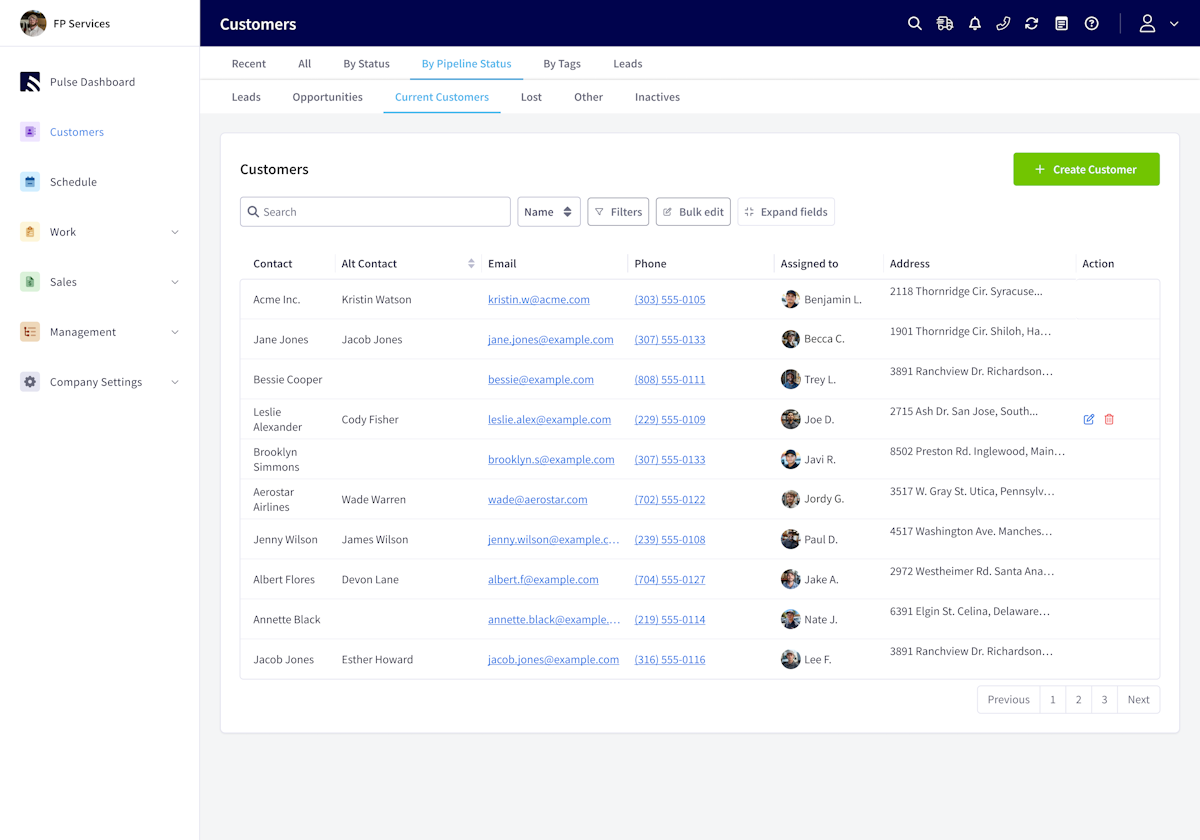
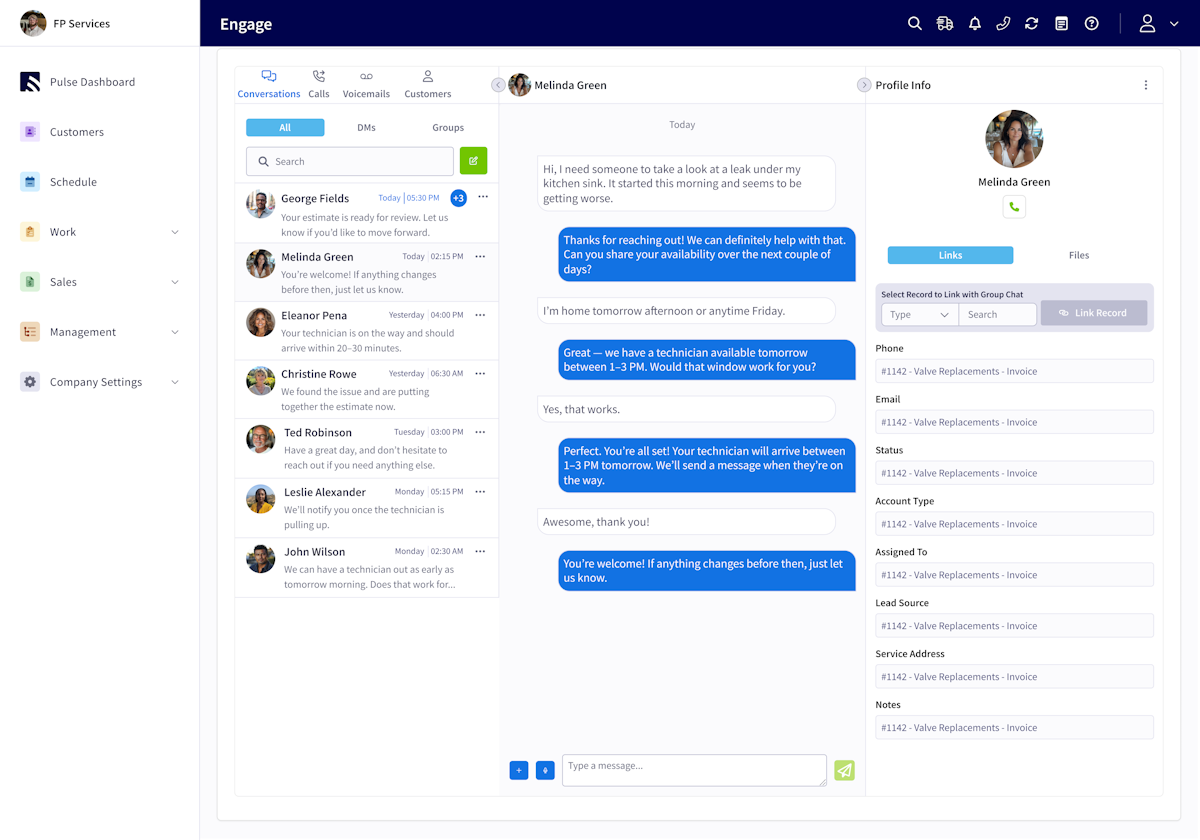
A quick look at the interface, so you know what you are getting before the trial.
What FieldPulse does
The areas we lean on most in daily use, and how FieldPulse handles each.
Scheduling & dispatch
A calendar and dispatch board with work order management, GPS and a mobile app keep technicians moving and the office informed.
Estimates & flat-rate pricebook
Build consistent, professional estimates from a flat-rate pricebook with good-better-best options that help techs upsell on site.
Invoicing & payments
Turn work into invoices, take card payments, and sync two-way with QuickBooks so the money side keeps pace with the field.
CRM & lead management
Customer and lead management with follow-ups keeps the sales pipeline and repeat work organised in one place.
Work order management
Create, assign and track work orders with customer and job history attached, from request to completion.
Inventory management
Track materials and stock against jobs, which many tools at this price leave out, for accurate costing and reordering.
Multi-location & open API
Multi-location support and an open API give a growing company room to scale and connect its other software.
Workflow automation
Automated reminders, follow-ups and workflow automation cut manual office work for a busy service team.
Reporting & analytics
Advanced reporting on jobs, revenue and technicians gives owners the numbers to run the business.
How FieldPulse works day to day
In daily use, FieldPulse aims to run a service business end to end from one platform. A lead lands in the CRM, becomes an estimate built from a flat-rate pricebook, gets scheduled and dispatched to a technician, and closes out as an invoice with a card payment, all tracked against the customer and job. The office and the field work from the same system rather than a stack of separate apps.
Scheduling and dispatching are the daily hub. A calendar and dispatch board, work order management, GPS and time tracking, and a mobile app that works offline keep technicians moving and the office informed, with automated reminders and workflow automation cutting manual steps for a busy team of technicians.
Estimating and getting paid are a strength for the price. A flat-rate pricebook lets technicians build consistent, professional estimates on site, good-better-best options help upsell, and invoices, payments and a two-way QuickBooks integration keep the money side moving. Reviewers credit the quote-to-cash flow for getting them paid faster.
The CRM and growth tools are what push FieldPulse past a basic app. Customer and lead management, follow-ups, multi-location support, inventory management and an open API give a growing company room to scale and connect its other software, which is unusual at this price point.
Across FieldPulse reviews the pattern is consistent, and it is worth reading a spread of them before you buy. Business owners praise the value, the wide feature set, the offline mobile app and responsive support, which is why it holds a 4.6 out of 5 from over 480 reviews with a 4.7 for customer service. Compared with alternatives, small businesses call it strong value, though the most common complaints in FieldPulse software reviews are the occasional sync issue or data bug, a learning curve from the breadth, and sales-led pricing that is not published upfront.
The honest ceiling is depth versus breadth. Because FieldPulse does so much, a few areas are not as refined as a dedicated specialist tool, and a business that needs the deepest version of one specific workflow may want a focused product. It rewards teams that value one affordable platform covering many jobs over best-in-class depth in a single area.
FieldPulse is built for the trades, and its reviews come from across them: HVAC, plumbing and electrical contractors, landscaping and lawn-care crews, roofing, painting and cleaning businesses, and appliance-repair and general contractors. Its broad, affordable approach fits the way small and mid-size service businesses actually run.
Compared with rivals, FieldPulse competes on breadth and value. It packs more features than a simpler tool like Jobber at a similar price, and covers much of what an enterprise platform like ServiceTitan does for a fraction of the cost, which is why growing service businesses shortlist it as an affordable all-in-one.
FieldPulse is cloud-based with iOS and Android apps that include an offline mode, and it integrates with QuickBooks Online and Desktop, Google Calendar and more. Its plans scale from small teams to larger field operations, and it holds strong ratings on Capterra and G2, which makes it a sensible fit for technicians and field crews as a business grows.
FieldPulse pros and cons
Pros
- Huge feature breadth for the price (flat-rate pricebook, CRM, inventory, API)
- Large, positive review base (4.6/5 from 480+ reviews)
- Strong, responsive customer support (4.7) and frequent updates
- Multi-location and open API for growing teams
- Solid quote-to-cash flow with QuickBooks sync
Cons
- Sales-led pricing, not published upfront
- Occasional sync issues or bugs reported by reviewers
- A few features are less deep than specialist tools
- Learning curve that comes with the breadth
- Costs can climb with add-ons and more users
Who should use FieldPulse, and who should skip it
A great fit if you
- You run a growing small or mid-size service or contractor team
- You want a broad all-in-one without an enterprise price
- You run HVAC, plumbing, electrical, landscaping or another trade
- You want a flat-rate pricebook, CRM and inventory in one tool
- You value strong customer support and frequent updates
Look elsewhere if you
- You need best-in-class depth in one specific workflow
- You want fully public, self-serve pricing with no sales call
- You are a solo operator who only needs the basics
- You need a single-vertical tool tuned to one trade
Is FieldPulse right for your trade?
FieldPulse is used across the main home-service trades. Here is how it fits each one, and what its reviews tend to say in that niche.
FieldPulse for HVAC
HVAC contractors use FieldPulse for the flat-rate pricebook, scheduling and QuickBooks-synced invoicing; its HVAC software reviews praise the value and support.
FieldPulse for Plumbing
Plumbing businesses run same-day dispatch, estimates and on-site card payment, common themes in its plumbing software reviews.
FieldPulse for Electrical
Electrical contractors quote from a pricebook, manage work orders and take payment, with multi-location support as they grow.
FieldPulse for Landscaping
Landscaping and lawn-care crews use recurring scheduling, the CRM and mobile invoicing for route-based work, a strength its landscaping software reviews note.
FieldPulse for Roofing
Roofing companies build good-better-best estimates, manage leads and crews, and collect deposits and payments in the field.
FieldPulse for Painting
Painting businesses use detailed estimates, lead management and follow-ups to win repeat and referral work.
FieldPulse for Cleaning
Cleaning companies rely on recurring scheduling, reminders and the customer CRM to manage repeat visits.
FieldPulse for Auto detailing
Mobile auto-detailing businesses use online scheduling and instant invoicing to run appointment-based work from a phone.
FieldPulse for Appliance repair
Appliance-repair techs use job history, parts and inventory, and mobile invoicing to close service calls on site.
FieldPulse for General contracting
General and specialty contractors use estimates, work orders and project tracking to run jobs from quote to paid.
FieldPulse scorecard
How FieldPulse scored across our rubric. Every tool is measured on the same areas.
FieldPulse pricing and plans
Real starting prices, dated and re-checked each pass. FieldPulse uses sales-led, custom pricing rather than public rates, scaling with users and modules; third-party sources have cited plans in the low-hundreds per month for small teams, but the current price comes from a quote. FieldPulse offers a guided demo, so confirm tiers and per-user costs directly with them.
Starts at Custom quote.
FieldPulse integrations
Tools FieldPulse connects with out of the box, so it fits the stack you already run.
 QuickBooks Online
QuickBooks Desktop
QuickBooks Online
QuickBooks Desktop
 Square Payments
 Google Calendar
 Zapier
 Azuga Fleet
Support, training and deployment
How you can reach the FieldPulse team, how they onboard you, and where it runs.
Support
- Email / Help Desk
- Phone Support
- Chat
- Knowledge Base
Training
- Live Online
- Webinars
- Documentation
- Videos
Deployment
- Cloud, SaaS, Web-Based
- Mobile - Android
- Mobile - iPhone / iPad
Typical customers
- Freelancers
- Small businesses
- Mid-size businesses
FieldPulse alternatives
If FieldPulse is not the fit, these are the closest tools we rank, in order.




How to test FieldPulse before you commit
Every tool demos well. These are the checks that actually tell you whether FieldPulse fits your shop, while the free trial is still running.
Run a real job end to end
- Book it, schedule it, dispatch a tech, then invoice and take payment
- Do it on the phone your techs actually carry, not a demo laptop
- Try it with weak signal in the field, not just on office wifi
- Add a second user and watch how the per-seat price moves
Watch for the catch
- Payment-processing fees taken on every card and ACH run
- Features quietly locked to a higher tier than the one you tried
- Onboarding or data import sold as a paid add-on
- How hard it is to export your data if you decide to leave
FieldPulse FAQ
How much does FieldPulse cost?
FieldPulse uses sales-led, custom pricing rather than public rates, and the price scales with users and modules. Third-party sources have cited plans in the low-hundreds of dollars a month for small teams, but the current cost comes from a quote. FieldPulse offers a guided demo, so confirm tiers directly with them.
What do FieldPulse reviews say?
Across FieldPulse reviews the pattern is consistent: users rate it 4.6 out of 5 from more than 480 reviews, with a standout 4.7 for customer service, and praise the value, the wide feature set and the frequent updates. The most common criticisms are the occasional sync issue and sales-led pricing.
Is FieldPulse worth it?
For a growing small or mid-size service business, yes. FieldPulse gives you scheduling, a flat-rate pricebook, CRM, invoicing, inventory and multi-location support in one affordable platform, which is why it rates so well on value. It is less worth it if you need best-in-class depth in one specific workflow.
FieldPulse vs Jobber: which should I choose?
Both are strong for small service teams. FieldPulse packs more features for the money, including a flat-rate pricebook, inventory and multi-location, while Jobber is a little more polished and simpler to set up. Choose FieldPulse for breadth and value, and Jobber for a cleaner, simpler experience.
FieldPulse vs Housecall Pro: which is better?
Housecall Pro leans harder into consumer marketing and a polished customer experience, while FieldPulse offers broader back-office features, a flat-rate pricebook and inventory at a competitive price. Pick Housecall Pro for marketing and polish, and FieldPulse for feature breadth and value.
Is FieldPulse good for HVAC and plumbing businesses?
Yes. HVAC, plumbing and electrical contractors are among FieldPulse's largest customer groups. The flat-rate pricebook, scheduling, work orders, inventory and QuickBooks sync map directly onto how trade service businesses quote and run jobs.
Does FieldPulse have a mobile app?
Yes. FieldPulse has a mobile app for iOS and Android that technicians use to see their schedule, view job and customer history, build estimates, take payment and update work orders from the field.
Does FieldPulse have a flat-rate pricebook?
Yes. A flat-rate pricebook is one of FieldPulse's standout features, letting technicians build consistent, professional estimates on site with good-better-best options that help upsell, which many tools at this price do not include.
Does FieldPulse integrate with QuickBooks?
Yes. FieldPulse syncs two-way with QuickBooks, and offers an open API and other integrations, so estimates, invoices and payments flow into your accounting without double entry.
Does FieldPulse support multiple locations?
Yes. Multi-location management and an open API are built in, which is part of why FieldPulse suits growing companies that are scaling past a single-branch, basic tool.
What are FieldPulse's main downsides?
The most common ones reviewers cite are the occasional sync issue or bug, a few features being less deep than specialist tools, sales-led pricing that is not published, and a learning curve that comes with the platform's breadth.
FieldPulse reviews from real users
Verified reviews from people running FieldPulse in the field. Every review is read by our team before it goes live, so this is honest signal, not spam.
No user reviews yet. If you use FieldPulse, be the first to tell other shops how it works in the real world.
You need a free account to post a review. Create one in under a minute and you will come right back here to write it.
Why our ranking is worth trusting
“We run a real week of jobs through every tool and score it against the same 40 points. If it wins, it earned it, and no vendor can change that.”
The Duhari review teamNot sure which tool fits?
Start from the full ranking, filtered by your trade and crew size, and pick the right tool with honest scores and real starting prices.