
Service Fusion Review
Service Fusion is a field service platform with an unusual pricing model, flat monthly plans with unlimited users, and this Service Fusion review weighs the pricing, features and what verified Service Fusion reviews say, so a growing HVAC, plumbing or electrical team can decide whether it fits.
On this page
The verdict
Service Fusion holds a 4.3 on Capterra but a lower 3.9 on G2, and its calling card is the pricing model: flat monthly tiers with unlimited users, so adding technicians does not add cost. For a growing team, that alone can make it far cheaper than per-user rivals, and around it sits a complete field-service platform, scheduling and dispatch, estimates and invoicing, GPS fleet tracking and an integrated phone system.
Where Service Fusion separates itself is unlimited users and communication. The flat-rate model rewards businesses with more than ten field techs, and the built-in VoIP phone system, with call handling and customer records tied to jobs, is unusual at this price. Founded in 2013 near Dallas and now part of EverCommerce, it has built a following among trade contractors who value predictable cost as they scale.
The trade-offs are the mixed reviews and the entry price. The interface feels dated to some reviewers, the G2 score trails Capterra, there is no free trial, and the flat plans start higher than per-user tools, so a solo operator or a two-person shop pays for headroom they do not need yet. For a growing trade business that will add technicians, though, Service Fusion is worth it and hard to beat on cost at scale.
Service Fusion at a glance
| Vendor | Service Fusion | Category | Field service management |
|---|---|---|---|
| Best for | growing teams that want flat-rate unlimited users | Starting price | $259-$649/mo |
| Free trial | Demo only | Free plan | No |
| User rating | 4.3/5 (308 reviews) | Our score | 8.3/10 |
| Deployment | Cloud, iOS, Android | Founded | 2013 |
| Headquarters | Colleyville, USA | Users | Unlimited |
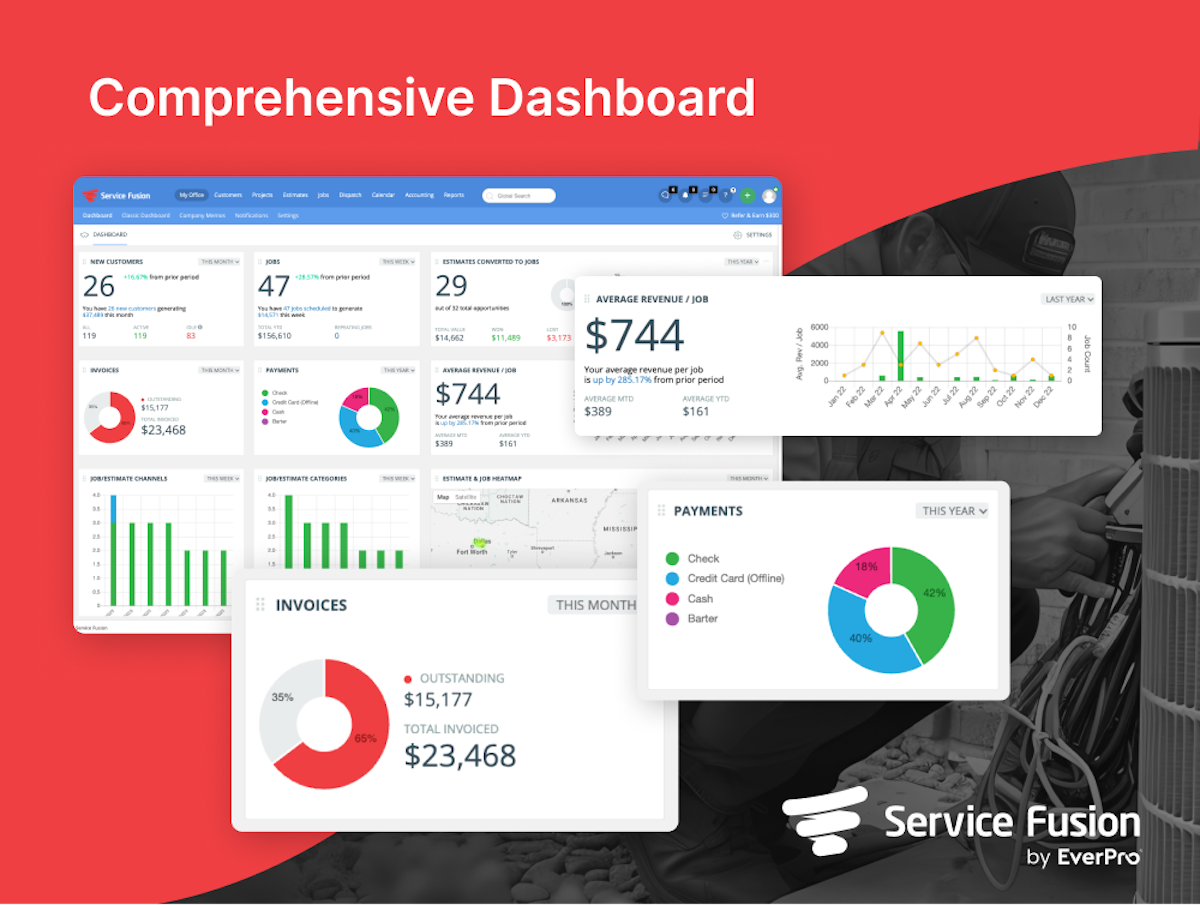
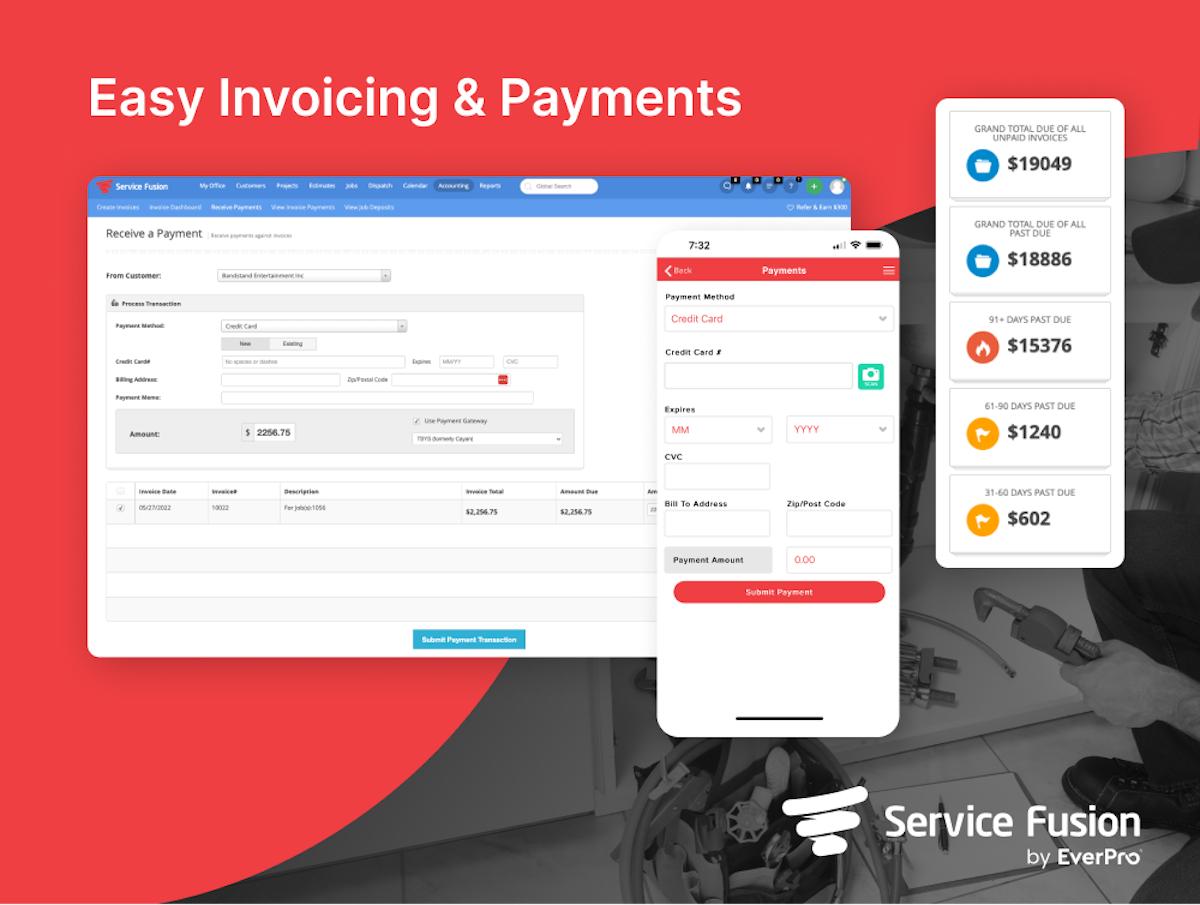
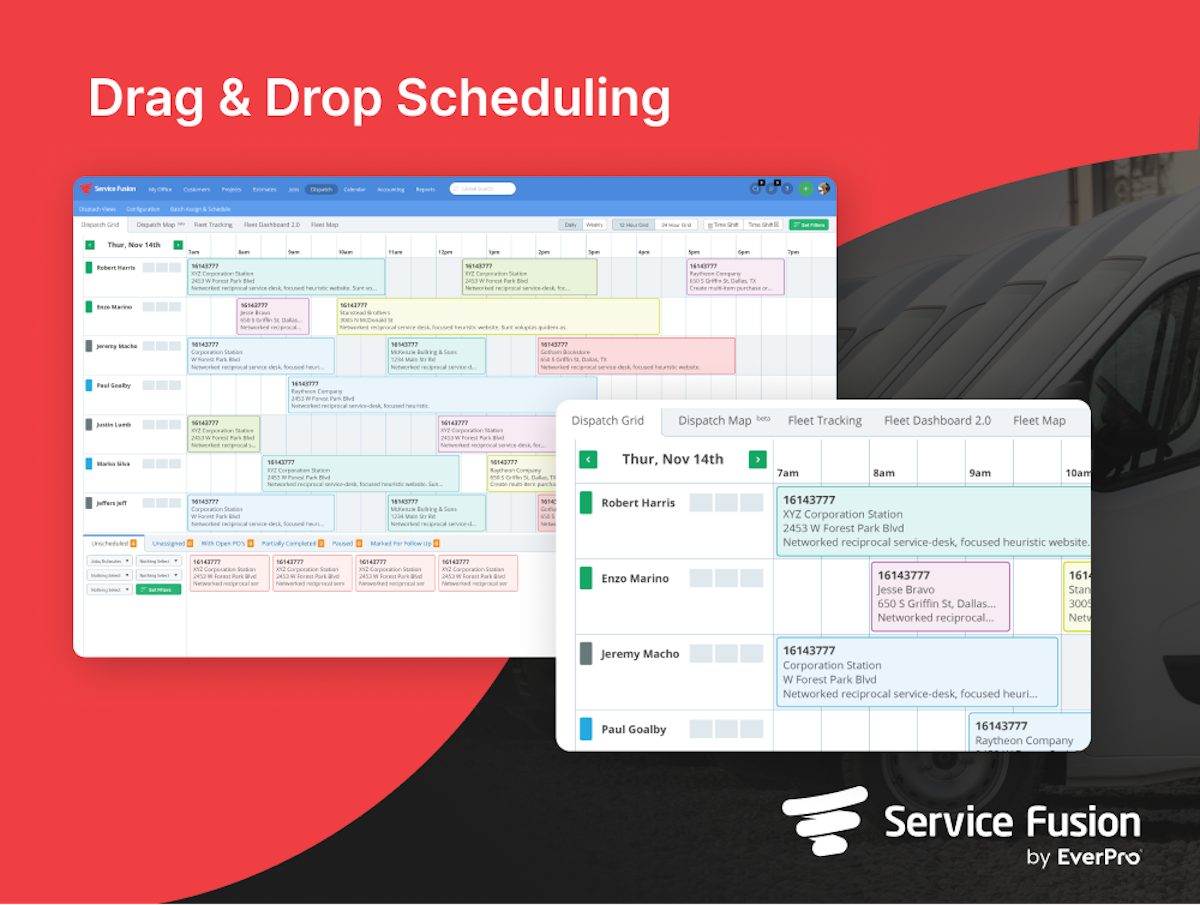
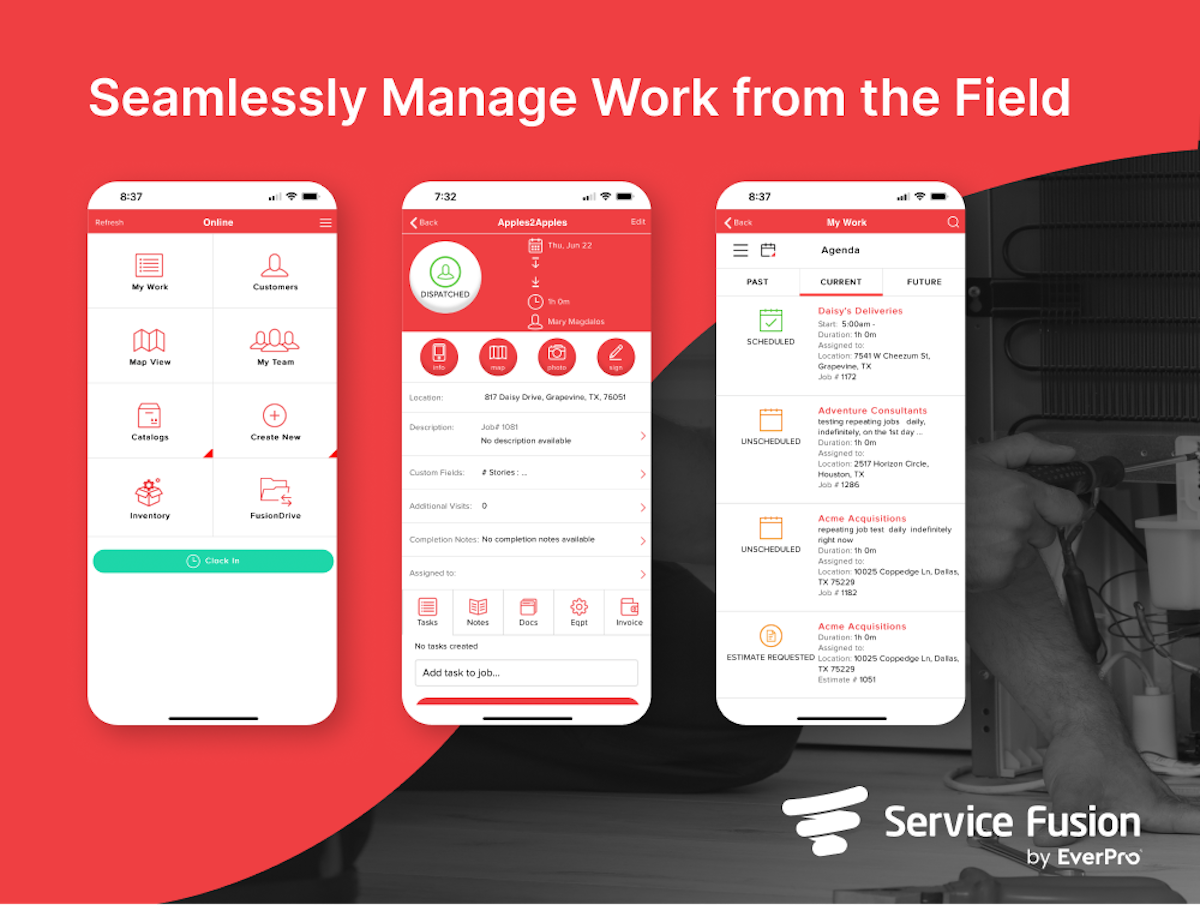
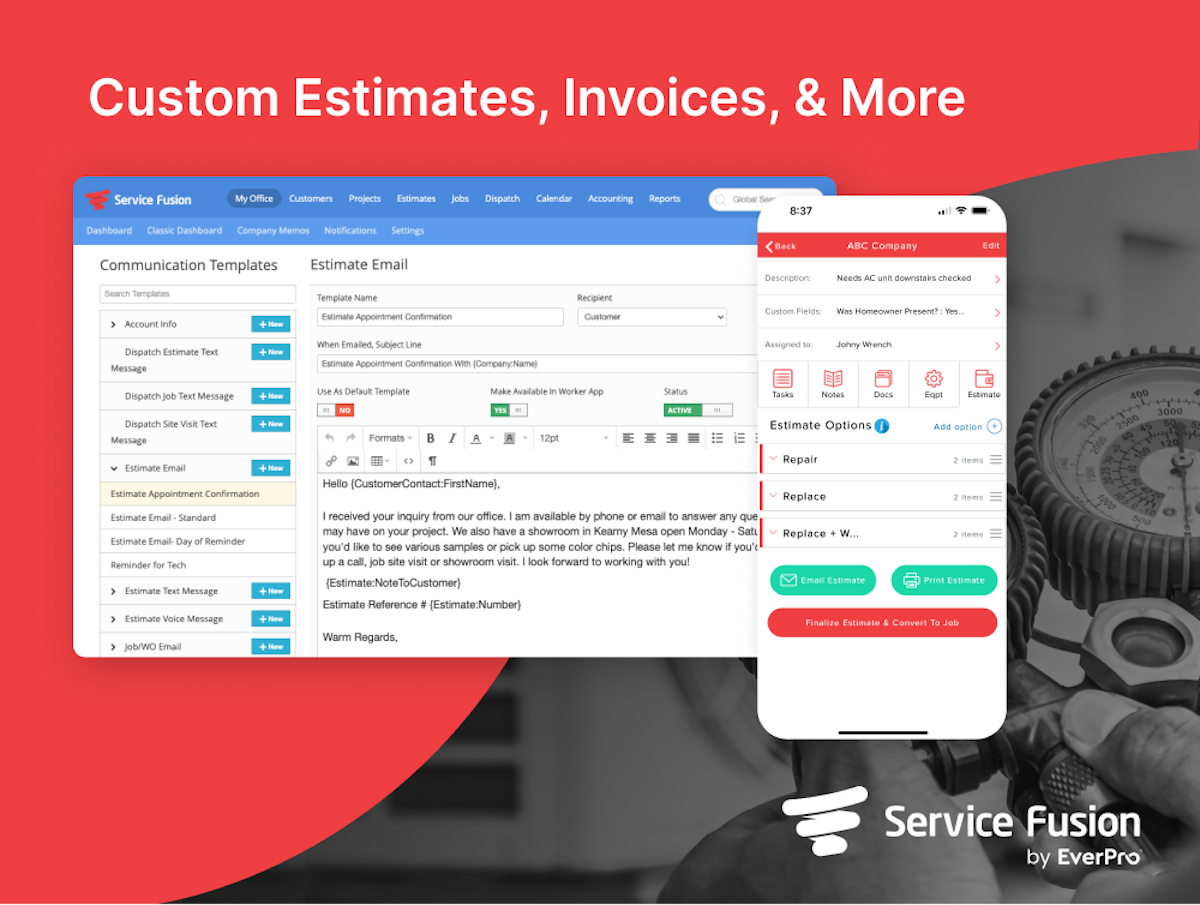
See Service Fusion in action
A quick look at the interface, so you know what you are getting before the trial.
What Service Fusion does
The areas we lean on most in daily use, and how Service Fusion handles each.
Unlimited users
Its signature. Every flat-rate plan includes unlimited users, so adding office staff and technicians never adds to the cost.
Integrated VoIP phone
A built-in phone system with caller ID matched to the customer record and call history tied to jobs, unusual at this price.
Scheduling & dispatch
A drag-and-drop dispatch board keeps technicians and jobs organised, with real-time status from call to completion.
GPS fleet tracking
See where every truck and technician is in real time to route the nearest crew and give accurate arrival windows.
Estimates & invoicing
Build estimates on site, convert them to invoices, and keep every job tied to the customer and its history.
Payments & QuickBooks
Take card payments and sync two-way with QuickBooks so billing and job costing stay in step with the field.
Job costing
Track labor, materials and costs against each job to see whether the work actually made money.
Customer communication
Automated reminders, on-the-way texts and email keep customers informed and cut no-shows.
Mobile app
Technicians run their day from the mobile app: schedule, job details, estimates, payment and status updates from the field.
Reporting, inventory & AI
Reporting and analytics, inventory management and newer AI-powered tools round out the platform, so owners can measure and automate as they grow.
How Service Fusion works day to day
In daily use, Service Fusion runs the trade business from the first call to the paid invoice. A customer calls in through the integrated phone system, the job is scheduled and dispatched to a technician, GPS shows where the crew is, and the work closes out with an estimate-turned-invoice and a card payment, all tied to the customer record. For a shop that runs several trucks, having the phone, schedule and payments in one place is the draw.
Scheduling, dispatch and fleet tracking cover the field. A drag-and-drop dispatch board, GPS fleet tracking and a mobile app keep technicians moving and the office informed, with real-time status and job history on every customer and piece of equipment.
Estimates, invoicing and payments are straightforward. Technicians build estimates and invoices on site, take payment, and everything syncs with QuickBooks, so a growing company can quote, bill and track job costing without a second tool. Reporting and analytics, inventory management and a guided demo round out the platform, and the mobile app has an offline mode for technicians with no signal.
The integrated phone system is the differentiator most reviewers single out. A built-in VoIP phone with call handling, caller ID matched to the customer record, and call history tied to jobs turns the phone into part of the software, which matters for a trade that books most work by phone. Service Fusion has also leaned into AI, pairing AI-powered tools with the VoIP phone to speed up call handling, customer communication and scheduling.
Unlimited users is the other signature, and it shapes the value. Because every plan includes unlimited users, a business does not pay more as it adds office staff and field technicians, which is why Service Fusion reviews from larger teams so often call the pricing its best feature.
Across Service Fusion reviews the pattern is mixed but clear. Business owners praise the unlimited-user value, the phone system and the all-in-one workflow, holding a 4.3 on Capterra, while the lower 3.9 on G2 reflects the other side: the most common complaints in Service Fusion software reviews are an interface that feels dated, occasional bugs, and support that some reviewers find inconsistent.
The honest ceiling is polish and entry cost. Service Fusion is built for growing teams, so a solo operator or a very small shop will find the flat plans start higher than a per-user tool and may prefer something simpler, and reviewers who want the most modern interface look elsewhere. It rewards trade businesses that will add technicians and use the phone and fleet depth.
Service Fusion is built for the field service trades, and its reviews come from across them: HVAC, plumbing and electrical contractors, garage-door and appliance-repair companies, and handyman and refrigeration businesses. Its flat-rate, unlimited-user model fits any trade shop that plans to grow its crew.
Compared with rivals, Service Fusion competes on cost at scale. It is often cheaper than a per-user tool like Jobber or Housecall Pro once you pass ten technicians, and its built-in phone system is deeper, though those tools are more polished and better rated as standalone apps, which is the trade-off a buyer weighs.
Beyond core field operations, Service Fusion helps a company track jobs, dispatching and invoices in one view, with a two-way QuickBooks integration, estimating, sales and marketing tools, reporting and guided onboarding to get a growing team running. Owners get the details and options to run the business without stitching manual processes together.
Service Fusion pros and cons
Pros
- Unlimited-user flat pricing that gets cheaper per head as you grow
- Built-in VoIP phone system tied to customer records and jobs
- Complete workflow: scheduling, GPS fleet, estimates, invoicing
- Two-way QuickBooks sync and job costing
- Strong value for teams of more than ten technicians
Cons
- Lower rated on G2 (3.9) than Capterra (4.3)
- Interface feels dated to some reviewers
- No free trial, and flat plans start higher than per-user tools
- Occasional bugs and inconsistent support in reviews
- Overkill for a solo operator or very small shop
Who should use Service Fusion, and who should skip it
A great fit if you
- You run a growing trade business that will add technicians
- You have, or expect, more than ten field or office users
- You want a built-in phone system tied to your jobs
- You run HVAC, plumbing, electrical or a similar trade
- You value flat, predictable cost over per-user billing
Look elsewhere if you
- You are a solo operator or a two-person shop
- You want the most modern, polished interface
- You want a free trial before you commit
- You want the lowest possible entry price
Is Service Fusion right for your trade?
Service Fusion is used across the main home-service trades. Here is how it fits each one, and what its reviews tend to say in that niche.
Service Fusion for HVAC
HVAC contractors use scheduling, GPS fleet tracking and the built-in phone; unlimited users keeps cost flat as the crew grows, a theme in its HVAC software reviews.
Service Fusion for Plumbing
Plumbing shops run same-day dispatch, on-site estimates and card payment, with every inbound call tied to the customer record.
Service Fusion for Electrical
Electrical contractors quote and invoice jobs, track trucks by GPS, and add technicians without adding per-user fees.
Service Fusion for Garage door
Garage-door companies use the phone system and fast dispatch to turn inbound calls into booked, paid jobs.
Service Fusion for Appliance repair
Appliance-repair businesses use job history, scheduling and mobile invoicing to handle high call volume efficiently.
Service Fusion for Handyman
Handyman businesses use the all-in-one workflow to schedule, quote and invoice without stitching tools together.
Service Fusion for Refrigeration
Commercial refrigeration firms track equipment history, dispatch technicians and invoice from one platform.
Service Fusion for Locksmith
Locksmiths run on inbound calls, so the integrated phone system and quick dispatch fit the trade.
Service Fusion for Pest control
Pest-control companies use recurring scheduling and route dispatch, with unlimited users for a growing team.
Service Fusion for General contracting
Trade contractors use estimates, job costing and QuickBooks sync to run field jobs from quote to paid.
Service Fusion scorecard
How Service Fusion scored across our rubric. Every tool is measured on the same areas.
Service Fusion pricing and plans
Real starting prices, dated and re-checked each pass. Service Fusion stopped publishing official pricing on its own site, and figures vary by source; commonly cited flat-rate tiers are Starter around $259/mo, Plus around $399/mo and Pro around $649/mo, all with unlimited users. There is no free trial. Confirm current rates with Service Fusion for your team.
- Unlimited users
- Estimates, scheduling and dispatch
- Invoicing and payments
- Customer management
- QuickBooks integration
- Everything in Starter
- Advanced reporting
- Job photo uploads
- Recurring invoicing
- Open API
- Everything in Plus
- Advanced customization
- Priority support
- Higher usage limits
Service Fusion integrations
Tools Service Fusion connects with out of the box, so it fits the stack you already run.
 QuickBooks Online
QuickBooks Desktop
QuickBooks Online
QuickBooks Desktop
 Microsoft Outlook
 Google Calendar
 Stripe
 Zapier
Support, training and deployment
How you can reach the Service Fusion team, how they onboard you, and where it runs.
Support
- Email / Help Desk
- Phone Support
- Chat
- Knowledge Base
Training
- Live Online
- Webinars
- Documentation
Deployment
- Cloud, SaaS, Web-Based
- Mobile - Android
- Mobile - iPhone / iPad
Typical customers
- Small businesses
- Mid-size businesses
Service Fusion alternatives
If Service Fusion is not the fit, these are the closest tools we rank, in order.




How to test Service Fusion before you commit
Every tool demos well. These are the checks that actually tell you whether Service Fusion fits your shop, while the free trial is still running.
Run a real job end to end
- Book it, schedule it, dispatch a tech, then invoice and take payment
- Do it on the phone your techs actually carry, not a demo laptop
- Try it with weak signal in the field, not just on office wifi
- Add a second user and watch how the per-seat price moves
Watch for the catch
- Payment-processing fees taken on every card and ACH run
- Features quietly locked to a higher tier than the one you tried
- Onboarding or data import sold as a paid add-on
- How hard it is to export your data if you decide to leave
Service Fusion FAQ
How much does Service Fusion cost?
Service Fusion uses flat monthly pricing with unlimited users. It stopped publishing prices publicly, but commonly cited tiers are Starter around $259/mo, Plus around $399/mo and Pro around $649/mo. There is no free trial, and because users are unlimited, the effective cost per person drops as your team grows.
What do Service Fusion reviews say?
Across Service Fusion reviews the pattern is mixed but clear: it holds a 4.3 on Capterra, with owners praising the unlimited-user value, the phone system and the all-in-one workflow, while a lower 3.9 on G2 reflects complaints about a dated interface, occasional bugs and inconsistent support.
Does Service Fusion include unlimited users?
Yes, and it is the main reason to choose it. Every flat-rate plan includes unlimited users, so adding office staff and field technicians never increases the price. That makes Service Fusion unusually cost-effective for teams of more than ten people.
Does Service Fusion have a built-in phone system?
Yes. Service Fusion includes an integrated VoIP phone system with caller ID matched to the customer record and call history tied to jobs, so the phone becomes part of the software, which matters for trades that book most work by phone.
Is Service Fusion worth it?
For a growing trade business that will add technicians, yes. The flat-rate unlimited-user pricing and built-in phone system can make it far cheaper and more capable than per-user tools at scale. It is less worth it for a solo operator or a very small shop that would pay for headroom it does not need.
Does Service Fusion have GPS fleet tracking?
Yes. Service Fusion includes GPS fleet tracking so you can see where every truck and technician is in real time, route the nearest crew, and give customers accurate arrival windows, alongside scheduling and dispatch.
Is Service Fusion good for HVAC and plumbing businesses?
Yes. HVAC, plumbing and electrical contractors are among Service Fusion's core users. Scheduling, dispatch, the phone system, estimates, invoicing and QuickBooks sync map onto how trade service businesses run, and unlimited users suits a growing crew.
Service Fusion vs Jobber: which should I choose?
Jobber is more polished and better rated as a standalone tool, and simpler for small crews. Service Fusion is often cheaper once you pass ten technicians thanks to unlimited-user pricing, and has a deeper built-in phone system. Choose Service Fusion for cost at scale and Jobber for polish and simplicity.
Does Service Fusion offer a free trial?
No. Service Fusion does not offer a public free trial or free plan. It uses flat-rate, quote-based pricing and offers a guided demo, so you evaluate it with the sales team rather than self-serve.
Does Service Fusion integrate with QuickBooks?
Yes. Service Fusion syncs two-way with QuickBooks so estimates, invoices, payments and job costing flow into your accounting without double entry.
What are Service Fusion's main downsides?
The most common ones reviewers cite are a lower G2 rating than Capterra, an interface that feels dated, occasional bugs and inconsistent support, no free trial, and flat plans that start higher than per-user tools, which makes it more than a solo operator needs.
Service Fusion reviews from real users
Verified reviews from people running Service Fusion in the field. Every review is read by our team before it goes live, so this is honest signal, not spam.
No user reviews yet. If you use Service Fusion, be the first to tell other shops how it works in the real world.
You need a free account to post a review. Create one in under a minute and you will come right back here to write it.
Why our ranking is worth trusting
“We run a real week of jobs through every tool and score it against the same 40 points. If it wins, it earned it, and no vendor can change that.”
The Duhari review teamNot sure which tool fits?
Start from the full ranking, filtered by your trade and crew size, and pick the right tool with honest scores and real starting prices.