
Workiz Review
Workiz is a field service platform built around the phone, and this Workiz review weighs the pricing, features and what verified Workiz reviews say, so a small, call-driven service business can decide whether its built-in phone system and SMS are worth it.
On this page
The verdict
Workiz earns a 4.4 out of 5 from its verified reviews, with its best marks for ease of use, and it stands out for one thing above all: a genuinely good built-in phone system. Call tracking, missed-call alerts, recordings and On My Way texts are baked in, not bolted on, which is exactly what a business that lives on inbound calls, like a locksmith, garage-door or appliance-repair company, actually needs alongside the usual scheduling, dispatch, invoicing and payments.
Where Workiz separates itself is communication and, increasingly, AI. Its Genius Suite adds Genius Answering and an AI Dispatcher that can handle calls and booking, and a free Lite plan for up to two users lets a new business start at no cost. For a small team that wins work over the phone and wants that tracked and automated, few tools match it at the price.
The trade-offs are that the value depends on how you use it. The phone and SMS power sit on the paid plans, which start around $229 a month for a team, and reviewers mention the occasional bug and a few features that are lighter than a specialist tool. For a call-driven home-service business, though, Workiz is worth it, and the phone-first approach is genuinely differentiated.
Workiz at a glance
| Vendor | Workiz | Category | Field service management |
|---|---|---|---|
| Best for | small service businesses that live on the phone | Starting price | $0-$270/mo |
| Free trial | Yes | Free plan | Yes |
| User rating | 4.4/5 (218 reviews) | Our score | 8.5/10 |
| Deployment | Cloud, iOS, Android | Founded | – |
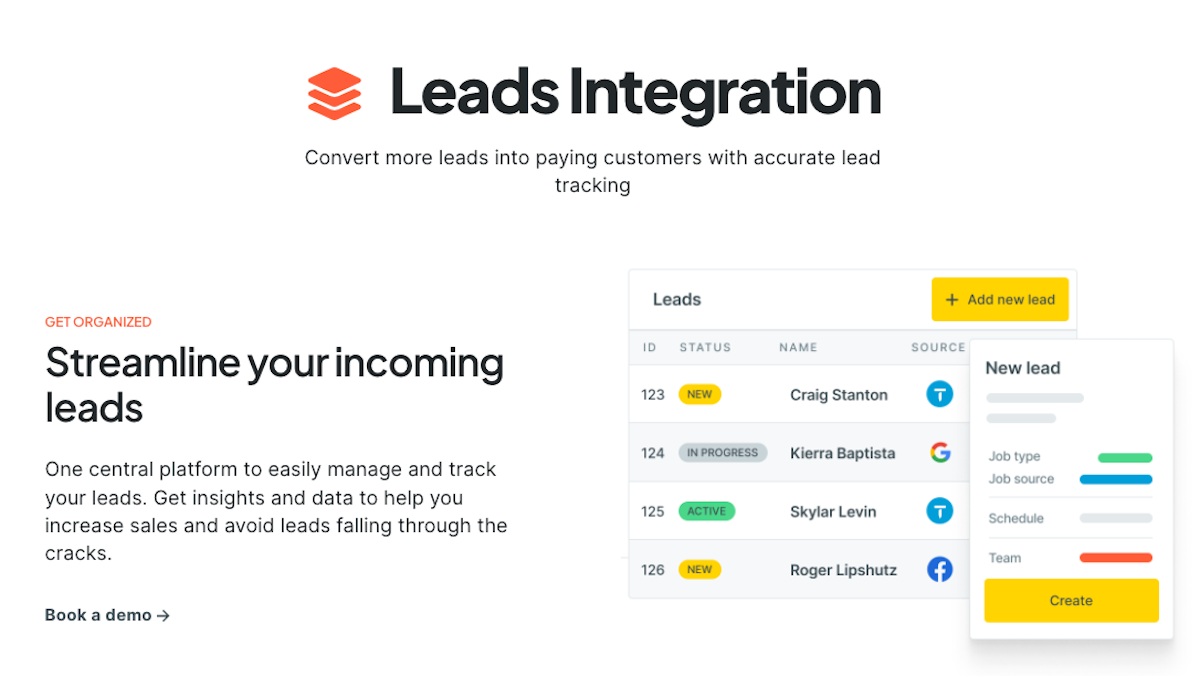
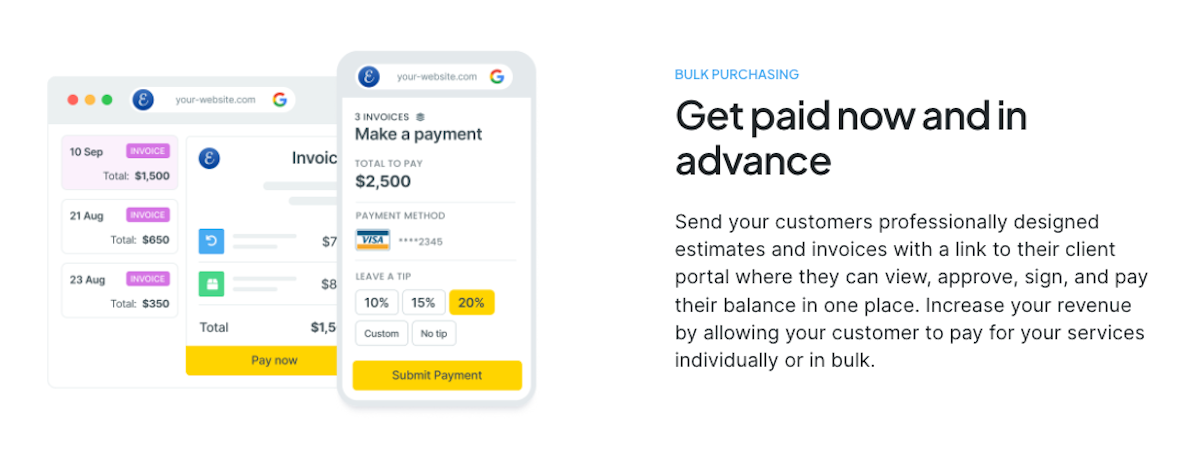
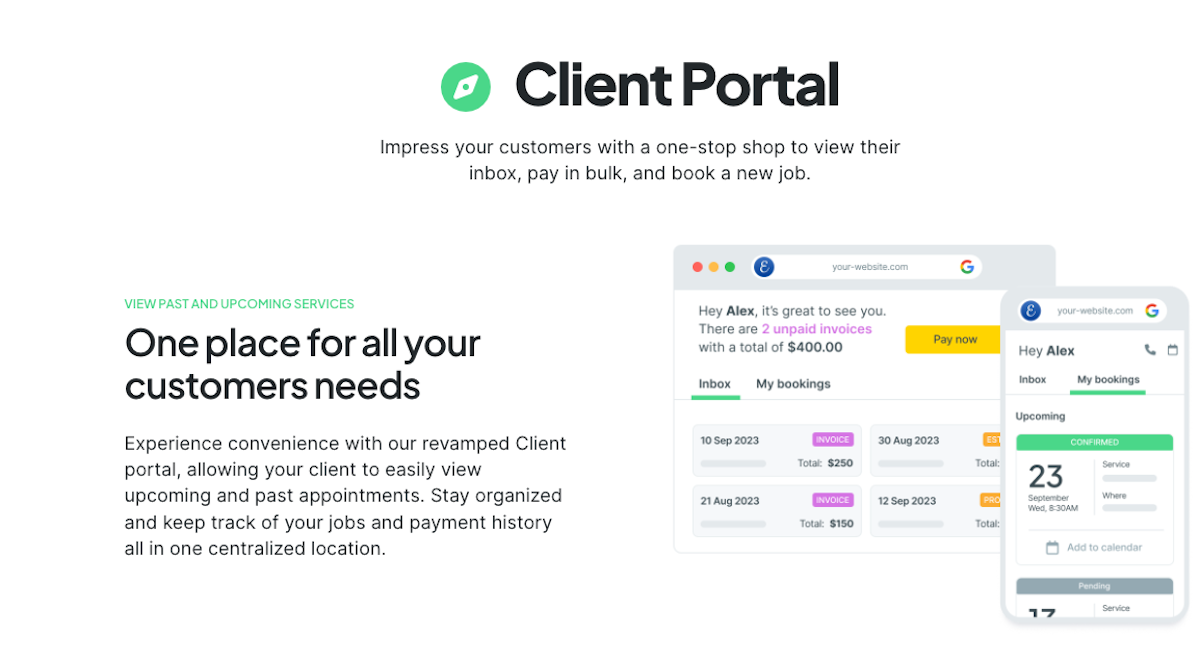
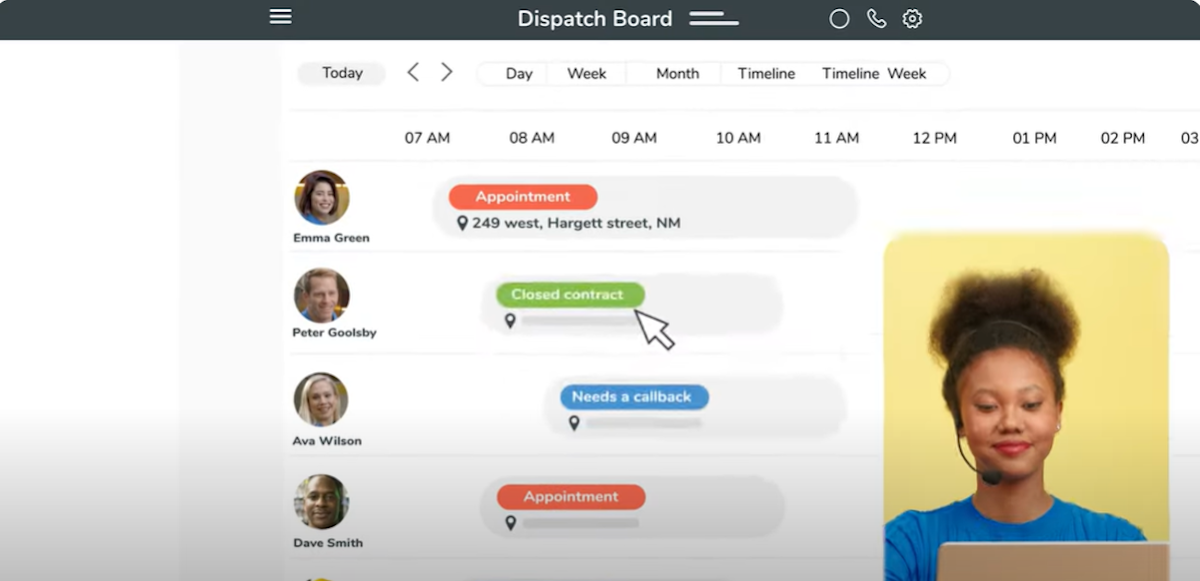
See Workiz in action
A quick look at the interface, so you know what you are getting before the trial.
What Workiz does
The areas we lean on most in daily use, and how Workiz handles each.
Built-in phone system
Its signature. Call tracking, recording, missed-call alerts and a business line are built in, so you see where every lead comes from.
SMS & On My Way texts
Two-way texting with automated reminders and On My Way messages keeps customers informed and cuts no-shows.
Scheduling & dispatch
A drag-and-drop calendar, dispatch board, work order management and GPS keep technicians moving and the office in the loop.
Genius Suite AI
Genius Answering picks up calls the team misses and an AI Dispatcher helps route and book work, so a small business never loses a job.
Estimates, invoices & payments
Build estimates and invoices, take card payments and sync two-way with QuickBooks to move from quote to cash.
Online booking
An online booking page lets customers request and schedule work themselves, feeding jobs straight into the calendar.
Client management
Customer and job history, notes and communication in one place keep follow-up and repeat work organised.
Mobile app
Technicians run their day from the mobile app: schedule, job details, payments and status updates from the field.
Reviews & marketing
Automated review requests and follow-ups help a call-driven business build its reputation and win repeat work.
How Workiz works day to day
In daily use, Workiz is built around the call. A customer phones in, Workiz logs and tracks the call, the office books the job on the schedule, dispatches a technician with an automatic On My Way text, and closes it out with an invoice and a card payment. For a business where most jobs start with a phone call, having the phone system inside the software instead of on a separate line is the whole point.
The integrated phone system is the signature. A whole business phone system with customizable phone numbers and answering options like a virtual receptionist, call tracking, call recording, missed-call alerts, email notifications and two-way texting gives an owner a clear picture of where leads come from and how the team handles customer service, which generic field-service tools simply do not offer.
Scheduling and dispatch cover the core. A drag-and-drop calendar, dispatch board, work order management, GPS tracking and a mobile app keep technicians moving and the office informed, with automations cutting the manual steps in between.
Getting paid is straightforward. Estimates and invoices, online booking, and online payment processing with a two-way QuickBooks integration move a job from quote to cash, and automated review requests and follow-ups help win repeat work. It is a complete quote-to-paid loop wrapped around the phone.
The Genius Suite is Workiz's push into AI. Genius Answering can pick up calls the team misses and an AI Dispatcher helps route and book work, aimed at making sure a small business never loses a job because no one answered the phone. It is an unusual, useful angle for a call-driven trade.
Across Workiz reviews the pattern is consistent, and it is worth reading a spread of them before you buy. Reviewers highlight the standout integrated phone system, rate Workiz 4.4 out of 5, and praise the ease of use and responsive customer service. The limitations reviewers note in Workiz software reviews are basic quoting, estimating and reporting, no flat-rate pricing, service agreements or multi-location support, payment processing fees you cover yourself, and that the strongest phone and automation functionality sits on the paid plans.
The honest ceiling is fit. Workiz is best for small, call-driven home-service businesses; a company that does not live on inbound calls, or that needs deep project or inventory management, will get less from the phone-first approach and may prefer a broader or more specialised platform. It rewards teams that will actually use the call tracking and communication depth.
Workiz is built for phone-driven home-service trades, and its reviews come from across them: locksmiths, garage-door and appliance-repair companies, HVAC and plumbing shops, cleaning and carpet-cleaning businesses, junk-removal and handyman operations. Its call-first design fits any business where the phone rings all day.
Compared with rivals, Workiz is the pick when communication is the priority. It goes deeper on the phone system, call tracking and SMS than a Jobber or a Housecall Pro, which handle scheduling and invoicing well but do not build the phone in, which is exactly why call-driven shops choose it.
Under the hood, Workiz scheduling and dispatch, customer management, invoicing and online payment processing cover the core, while the whole integrated phone system, a customizable virtual receptionist and email options give field technicians and the office one place to run every job. Its functionality is strongest on communication, and while the limitations include no flat-rate pricing and basic reporting, its customer service is consistently well rated across the trades it serves.
Workiz pros and cons
Pros
- Best-in-class built-in phone system, call tracking and SMS
- Genuinely easy to use, with strong ease-of-use marks
- Free Lite plan for up to two users to start at no cost
- Genius Suite AI answering and dispatch for call-driven shops
- Solid scheduling, invoicing and QuickBooks-synced payments
Cons
- The strongest phone and automation features sit on paid plans (from ~$229/mo)
- Quoting, estimating and reporting are basic; no flat-rate pricing
- No flat-rate pricing, service agreements or multi-location support
- Payment processing fees and occasional bugs reported by reviewers
- Best only if your business is genuinely call-driven
Who should use Workiz, and who should skip it
A great fit if you
- You run a small, call-driven home-service business
- You are a locksmith, garage-door, appliance-repair or similar trade
- You want the phone system, call tracking and SMS built in
- You want to start free and add users as you grow
- You want AI that answers and books calls you would otherwise miss
Look elsewhere if you
- Your business does not run on inbound phone calls
- You need deep project or inventory management
- You want the cheapest possible plan with phone features included
- You need a single-vertical tool tuned to one trade
Is Workiz right for your trade?
Workiz is used across the main home-service trades. Here is how it fits each one, and what its reviews tend to say in that niche.
Workiz for Locksmith
Locksmiths run on inbound calls, so Workiz's phone system, call tracking and fast dispatch fit the trade better than a generic tool.
Workiz for Garage door
Garage-door companies use call tracking, On My Way texts and mobile invoicing to turn phone leads into booked, paid jobs.
Workiz for Appliance repair
Appliance-repair businesses use job history, scheduling and the built-in phone to handle high call volume efficiently.
Workiz for HVAC
HVAC shops use scheduling, dispatch, invoicing and the phone tools to manage service calls and win repeat work.
Workiz for Plumbing
Plumbing businesses use same-day dispatch, SMS reminders and on-site payment, with every call tracked to its source.
Workiz for Cleaning
Cleaning companies use recurring scheduling, reminders and the client database to keep repeat visits filled.
Workiz for Carpet cleaning
Carpet-cleaning businesses use online booking, call tracking and automated follow-ups to build a steady customer base.
Workiz for Junk removal
Junk-removal companies use fast phone-to-schedule booking and mobile invoicing to run high-volume, same-day jobs.
Workiz for Electrical
Electrical contractors quote and dispatch service work and track where their phone leads come from.
Workiz for Handyman
Handyman businesses use the free plan and simple scheduling, invoicing and SMS to look professional without a big cost.
Workiz scorecard
How Workiz scored across our rubric. Every tool is measured on the same areas.
Workiz pricing and plans
Real starting prices, dated and re-checked each pass. Workiz offers a free Lite plan for up to two users. Paid plans, Standard around $229/mo and Pro around $270/mo, add team scheduling, automation, QuickBooks sync and the phone and SMS tools, and an Ultimate plan is custom-priced. Some phone and add-on features are billed on top, so confirm the exact configuration for your team.
- Up to 2 users
- Scheduling and invoicing
- Online payments
- Basic client management
- Team scheduling and dispatch
- Automation and reminders
- QuickBooks sync
- Reporting
- Add-on phone and SMS
- Everything in Standard
- Advanced automation
- Sales and marketing tools
- Priority features
- Everything in Pro
- Custom limits and support
- Tailored onboarding
Workiz integrations
Tools Workiz connects with out of the box, so it fits the stack you already run.
 QuickBooks Online
QuickBooks Desktop
QuickBooks Online
QuickBooks Desktop
 Authorize.net
 Zapier
 Google Calendar
 Stripe
 Microsoft Outlook
 Mailchimp
 CompanyCam
 Salesforce
Support, training and deployment
How you can reach the Workiz team, how they onboard you, and where it runs.
Support
- Email / Help Desk
- Phone Support
- Chat
- Knowledge Base
- FAQs / Forum
Training
- Live Online
- Webinars
- Documentation
- Videos
Deployment
- Cloud, SaaS, Web-Based
- Mobile - Android
- Mobile - iPhone / iPad
Typical customers
- Freelancers
- Small businesses
- Mid-size businesses
Workiz alternatives
If Workiz is not the fit, these are the closest tools we rank, in order.




How to test Workiz before you commit
Every tool demos well. These are the checks that actually tell you whether Workiz fits your shop, while the free trial is still running.
Run a real job end to end
- Book it, schedule it, dispatch a tech, then invoice and take payment
- Do it on the phone your techs actually carry, not a demo laptop
- Try it with weak signal in the field, not just on office wifi
- Add a second user and watch how the per-seat price moves
Watch for the catch
- Payment-processing fees taken on every card and ACH run
- Features quietly locked to a higher tier than the one you tried
- Onboarding or data import sold as a paid add-on
- How hard it is to export your data if you decide to leave
Workiz FAQ
How much does Workiz cost?
Workiz has a free Lite plan for up to two users. Paid plans are around $229/mo (Standard) and $270/mo (Pro), adding team scheduling, automation, QuickBooks sync and the phone and SMS tools, with a custom-priced Ultimate plan. Some phone and add-on features are billed on top.
What do Workiz reviews say?
Across Workiz reviews the pattern is consistent: users rate it 4.4 out of 5, praise the ease of use and especially the built-in phone and SMS tools, and single out responsive support. The most common criticisms are the occasional bug and that the strongest phone and automation features sit on the paid plans.
Is Workiz worth it?
For a small, call-driven home-service business, yes. Workiz's built-in phone system, call tracking and SMS are genuinely differentiated, and the free Lite plan lets you start at no cost. It is less worth it if your business does not run on inbound calls or you need deep project or inventory management.
Does Workiz have a built-in phone system?
Yes, and it is the signature feature. Workiz includes a business phone line with call tracking, call recording, missed-call alerts and two-way SMS, so you can see where every lead comes from and how your team handles it, which most field-service tools do not offer.
Does Workiz have AI features?
Yes. Workiz's Genius Suite includes Genius Answering, which can pick up calls the team misses, and an AI Dispatcher that helps route and book work, aimed at making sure a call-driven business never loses a job because no one answered the phone.
Does Workiz have a free plan?
Yes. The free Lite plan covers up to two users with scheduling, invoicing, online payments and basic client management, so a new business can start at no cost and upgrade to a paid plan for team, phone and automation features as it grows.
Workiz vs Jobber: which should I choose?
Jobber is a polished all-rounder for home-service crews. Workiz is the pick when communication is the priority: it builds in a phone system, call tracking and SMS that Jobber does not. Choose Workiz if your business runs on inbound calls, and Jobber for a broader, simpler workflow.
Is Workiz good for locksmiths and garage-door companies?
Yes. Locksmiths, garage-door and appliance-repair companies are among Workiz's core users because those businesses live on inbound calls. The built-in phone, call tracking and fast dispatch map directly onto how a call-driven trade actually runs.
Does Workiz have a mobile app?
Yes. Technicians use the Workiz mobile app on iOS and Android to see their schedule and job details, communicate with customers, take payment and update job status from the field.
Does Workiz integrate with QuickBooks?
Yes. Workiz syncs two-way with QuickBooks, alongside other integrations, so estimates, invoices and payments flow into your accounting without double entry.
What are Workiz's main downsides?
The most common ones reviewers cite are the occasional bug, that the strongest phone and automation features are on the paid plans that start around $229/mo, and that a few areas are lighter than a specialist tool. It is best only if your business is genuinely call-driven.
Workiz reviews from real users
Verified reviews from people running Workiz in the field. Every review is read by our team before it goes live, so this is honest signal, not spam.
No user reviews yet. If you use Workiz, be the first to tell other shops how it works in the real world.
You need a free account to post a review. Create one in under a minute and you will come right back here to write it.
Why our ranking is worth trusting
“We run a real week of jobs through every tool and score it against the same 40 points. If it wins, it earned it, and no vendor can change that.”
The Duhari review teamNot sure which tool fits?
Start from the full ranking, filtered by your trade and crew size, and pick the right tool with honest scores and real starting prices.