
Zoho FSM Review
Zoho FSM is Zoho's field service platform, built to slot into the wider Zoho ecosystem, and this Zoho FSM review weighs the pricing, features and what verified Zoho FSM reviews say, so a service business, especially one already using Zoho, can decide whether it fits.
On this page
The verdict
Zoho FSM earns a 4.6 out of 5 from around 50 verified reviews, and its appeal is clearest for businesses already living in the Zoho ecosystem. From the makers of Zoho CRM, it covers the core field-service loop, work orders, a dispatch console with scheduling, a mobile app, and invoicing with payments, and connects natively to Zoho CRM, Books, Desk and Inventory, which is a genuine advantage if those tools already run your business.
Where Zoho FSM separates itself is value and integration. It is priced by appointment volume rather than per user, so a free tier covers 30 appointments a month for up to 20 users and paid plans (Standard, Professional and Premium) start around $30 a month, which keeps it unusually cheap for a growing team. Reviewers repeatedly call it the most complete field-service product they found at the price, and multi-currency, regional taxes and low-code custom fields and workflows fit global and non-standard businesses.
The trade-offs are those of a newer product. Its ease-of-use score (4.2) trails the leaders, the offline and mobile experience is still maturing, and it makes the most sense inside the Zoho stack rather than as a standalone pick. For a small service business that wants an affordable, deeply integrated platform, though, especially one already on Zoho CRM or Books, Zoho FSM is worth it and hard to beat on value.
Zoho FSM at a glance
| Vendor | Zoho Corporation | Category | Field service management |
|---|---|---|---|
| Best for | businesses already using Zoho CRM and Books | Starting price | $0-$55/mo |
| Free trial | Yes | Free plan | Yes |
| User rating | 4.6/5 (50 reviews) | Our score | 8.5/10 |
| Deployment | Cloud, iOS, Android | Founded | – |
| Headquarters | US & India | Users | – |
See Zoho FSM in action
A quick look at the interface, so you know what you are getting before the trial.
What Zoho FSM does
The areas we lean on most in daily use, and how Zoho FSM handles each.
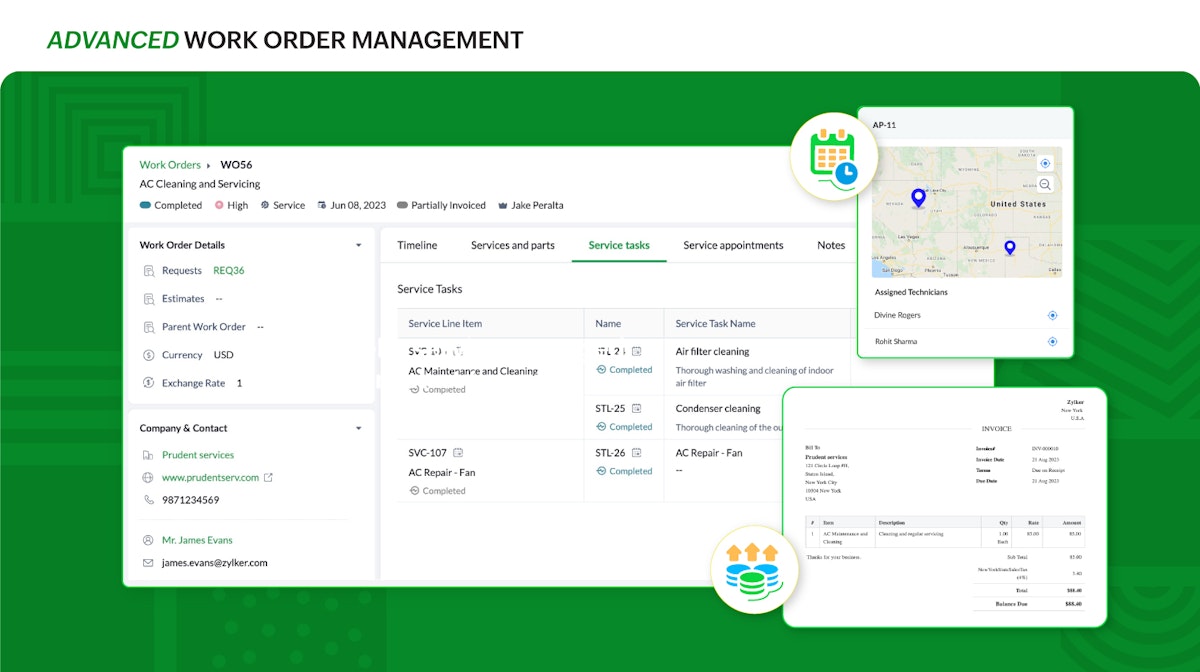
Work order management
Turn service requests into work orders with estimates, track job status from request to completion, and keep service history in one place.
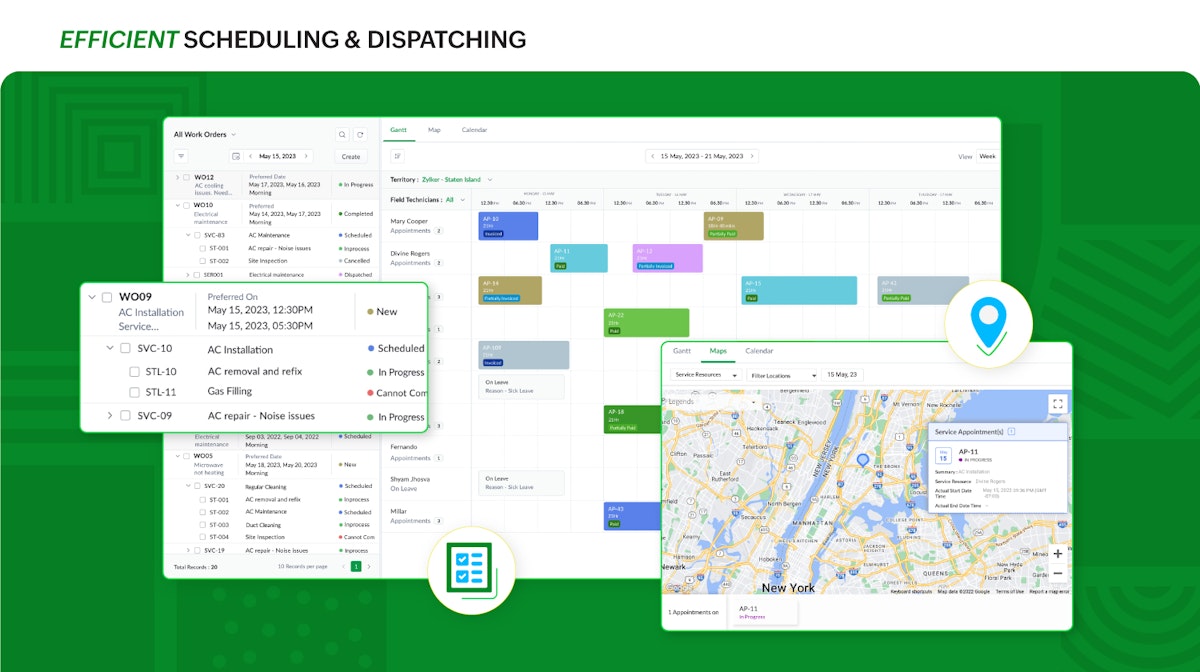
Dispatch Console & scheduling
Gantt charts, a grid view, real-time maps and location tracking let dispatchers schedule and assign work across a team of technicians.
Invoicing & payments
Estimates and invoices with multi-currency support, regional taxes and online payment gateways, built for businesses that operate across regions.
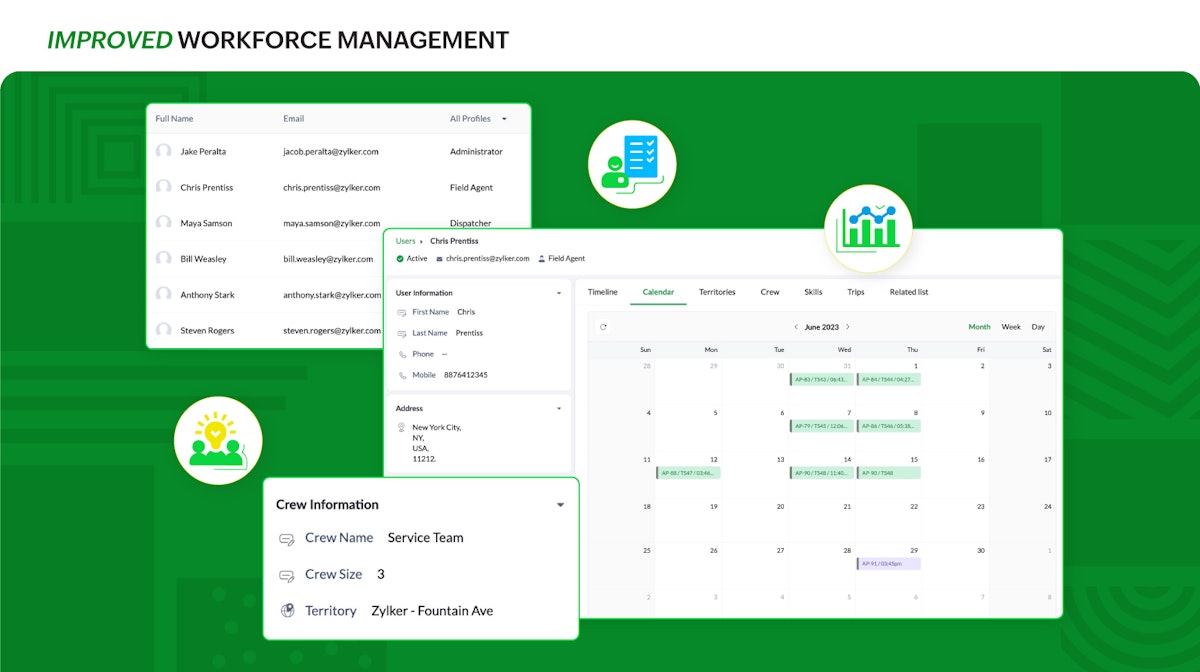
Mobile app
Technicians log timesheets, share notes, capture images, track trips, create service reports and generate invoices from a phone.
Zoho ecosystem integration
Its signature. Native connections to Zoho CRM, Books, Desk, Bigin and Inventory so data flows between apps without duplicate entry.
Customisable forms & low-code
Zoho's low-code tools let you shape forms, fields and workflows to fit non-standard processes without a developer.
Inventory & assets
Track parts, stock and assignable resources against jobs, with Zoho Inventory integration for deeper stock control.
Service reports & history
Field technicians generate service reports on site, and full customer and service history stays available to the office.
Free plan & value
A free entry tier and low per-user paid plans make it one of the best-value field-service tools for a small business.
How Zoho FSM works day to day
In daily use, Zoho FSM runs the service business from request to paid invoice. A service request becomes a work order with an estimate, lands on the dispatch console to be scheduled and assigned, the technician completes it on the mobile app with notes, photos and a service report, and it closes out as an invoice with an online payment. The whole flow is designed to feel like the rest of Zoho, which is the point for an existing Zoho customer.
The Dispatch Console is the operational hub. Gantt charts, a grid view, real-time maps and location tracking let a dispatcher schedule and assign work orders across a team, see where technicians are, and keep jobs moving, with a clear view of status from request to completion.
Invoicing and payments are unusually global for the price. Zoho FSM handles estimates and invoices with multi-currency support, regional taxes and online payment gateways, so a business that operates across regions can bill correctly without bolting on another tool. It is a genuinely international take on field-service billing.
The mobile app carries the field side. Technicians log timesheets, share notes, capture images, track trips, create service reports and generate invoices from a phone, keeping the office and the field in sync, though reviewers note the offline experience is still maturing compared with older tools.
Deep Zoho integration is the signature. Zoho FSM connects natively to Zoho CRM, Zoho Books, Zoho Desk, Bigin and Zoho Inventory, so customer data, accounting, support tickets and stock flow between apps without duplicate entry. For a business already standardised on Zoho, that single-vendor stack is the main reason to choose it, and Zoho's low-code customisation lets you shape forms and workflows to fit.
Across Zoho FSM reviews the pattern is consistent, and it is worth reading a spread of them before you buy. Business owners praise the value and the Zoho integration, calling it the most complete field-service product at the price, which is why it holds a 4.6 out of 5. The most common complaints in Zoho FSM software reviews are a steeper learning curve, an offline and mobile experience that is still maturing, and that it shines most when you already run other Zoho apps. Reviewers also flag that appointment-volume pricing needs modelling against per-user alternatives, and that mobile workflows and accounting sync are worth field-testing first.
The honest ceiling is maturity and fit. Zoho FSM is a newer product with a smaller review base, and because it is not trade-specific out of the box you configure your own services, parts, statuses, custom fields and workflows during setup, which is flexible but puts the configuration work on you. A business that is not on Zoho, or that wants the most polished, ready-made experience, may prefer a dedicated tool.
Zoho FSM is built for small service businesses across the trades, and its reviews come from home services, HVAC, plumbing, roofing and electrical contractors, and facilities-management companies. Its affordable, integrated, customisable approach fits businesses that want field service to live alongside the rest of their software.
Compared with standalone rivals, Zoho FSM competes on price and integration. It is cheaper and far more connected to CRM and accounting than a Jobber or a Housecall Pro if you are on Zoho, though those tools are more polished and mature as standalone field-service apps, which is the trade-off a buyer weighs.
As a complete field service platform for small service businesses with modest appointment volumes, Zoho FSM handles the full flow: customer requests and estimates become work orders, appointments are scheduled and dispatched to technicians, the mobile app tracks trips, time and location, and invoices go out on completion. Work orders, appointments, estimates and invoices all stay linked to the customer record and to Zoho's wider apps.
Zoho FSM pros and cons
Pros
- Outstanding value; called the most complete FSM at the price
- Deep native integration with Zoho CRM, Books, Desk and Inventory
- Multi-currency, regional taxes and global billing built in
- Low-code customisation of forms and workflows
- Free entry tier and low per-user paid plans
Cons
- Ease of use (4.2) trails the leading standalone tools
- Newer product with a smaller review base
- Offline and mobile experience is still maturing
- Not trade-specific out of the box; you configure services, parts and custom fields yourself
- Less out-of-the-box polish than dedicated field-service apps
Who should use Zoho FSM, and who should skip it
A great fit if you
- You already use Zoho CRM, Books or other Zoho apps
- You want an affordable, deeply integrated field-service platform
- You need multi-currency, regional taxes or global billing
- You want low-code customisation of forms and workflows
- You run a small home-service or contractor business
Look elsewhere if you
- You are not on the Zoho ecosystem and want a standalone tool
- You want the most polished, out-of-the-box experience
- You need the most mature offline mobile app
- You want a large, established review base to lean on
Is Zoho FSM right for your trade?
Zoho FSM is used across the main home-service trades. Here is how it fits each one, and what its reviews tend to say in that niche.
Zoho FSM for HVAC
HVAC contractors use work orders, the dispatch console and invoicing, with Zoho CRM and Books integration for an all-in-one back office.
Zoho FSM for Plumbing
Plumbing businesses schedule and dispatch jobs, capture service reports on the mobile app, and bill with multi-currency invoicing.
Zoho FSM for Roofing
Roofing companies manage estimates, work orders and inventory, and connect field jobs to their Zoho CRM pipeline.
Zoho FSM for Electrical
Electrical contractors track work orders, assets and service history, and quote and invoice from one integrated platform.
Zoho FSM for Facilities management
Facilities teams schedule recurring maintenance, track assets and resources, and report on service across multiple sites.
Zoho FSM for Home services
Home-service businesses use affordable work-order-to-invoice flow with a mobile app and native Zoho integrations.
Zoho FSM for Appliance repair
Appliance-repair techs log jobs, parts and service reports on the mobile app and keep customer history in Zoho CRM.
Zoho FSM for Landscaping
Landscaping crews schedule recurring visits on the dispatch console and invoice with Zoho Books integration.
Zoho FSM for Cleaning
Cleaning companies manage recurring work orders, teams and billing in one low-cost, customisable platform.
Zoho FSM for General contracting
Contractors use customisable forms, inventory and Zoho integration to run field jobs alongside the rest of their business.
Zoho FSM scorecard
How Zoho FSM scored across our rubric. Every tool is measured on the same areas.
Zoho FSM pricing and plans
Real starting prices, dated and re-checked each pass. Zoho FSM prices by appointment volume, not per user, which keeps it cheap for larger teams. A free tier covers 30 appointments a month for up to 20 users; paid plans (Standard, Professional, Premium) run from roughly $30/mo and scale with monthly appointments and user limits (up to 200 users on Standard). Confirm current volumes and rates with Zoho.
- 30 appointments a month
- Up to 20 users
- Work orders, dispatch and invoicing
- Mobile app
- Great for evaluation
- 60 appointments a month
- Up to 200 users
- Zoho CRM and Books integration
- Automation and custom fields
- Dispatch console with maps
- Higher appointment volume
- Advanced workflows and reports
- Multi-currency invoicing
- More customisation
- Highest appointment volume
- All features and APIs
- Inventory and assets
- Priority support
Zoho FSM integrations
Tools Zoho FSM connects with out of the box, so it fits the stack you already run.
 Zoho CRM
Zoho Books
Zoho Desk
Zoho Flow
Zoho CRM
Zoho Books
Zoho Desk
Zoho Flow
 WhatsApp
Bigin by Zoho CRM
WhatsApp
Bigin by Zoho CRM
Support, training and deployment
How you can reach the Zoho FSM team, how they onboard you, and where it runs.
Support
- Email / Help Desk
- Phone Support
- Chat
- Knowledge Base
Training
- Live Online
- Webinars
- Documentation
- Videos
Deployment
- Cloud, SaaS, Web-Based
- Mobile - Android
- Mobile - iPhone / iPad
Typical customers
- Small businesses
- Mid-size businesses
Zoho FSM alternatives
If Zoho FSM is not the fit, these are the closest tools we rank, in order.




How to test Zoho FSM before you commit
Every tool demos well. These are the checks that actually tell you whether Zoho FSM fits your shop, while the free trial is still running.
Run a real job end to end
- Book it, schedule it, dispatch a tech, then invoice and take payment
- Do it on the phone your techs actually carry, not a demo laptop
- Try it with weak signal in the field, not just on office wifi
- Add a second user and watch how the per-seat price moves
Watch for the catch
- Payment-processing fees taken on every card and ACH run
- Features quietly locked to a higher tier than the one you tried
- Onboarding or data import sold as a paid add-on
- How hard it is to export your data if you decide to leave
Zoho FSM FAQ
How much does Zoho FSM cost?
Zoho FSM prices by appointment volume rather than per user. A free tier covers 30 appointments a month for up to 20 users, and paid plans, Standard, Professional and Premium, start around $30/mo and scale with monthly appointments and user limits (up to 200 users on Standard). That appointment-based model makes it unusually cheap for larger teams.
What do Zoho FSM reviews say?
Across Zoho FSM reviews the pattern is consistent: users rate it 4.6 out of 5 from around 50 reviews and repeatedly call it the most complete field-service product at the price, praising the value and the Zoho integration. The most common criticisms are a steeper learning curve and an offline experience that is still maturing.
Is Zoho FSM worth it?
For a small service business, especially one already using Zoho CRM or Books, yes. Zoho FSM gives you work orders, dispatch, a mobile app and global invoicing at one of the lowest prices in the category, with native Zoho integration. It is less worth it if you are not on Zoho and want the most polished standalone tool.
Does Zoho FSM integrate with Zoho CRM and Books?
Yes, and it is the main reason to choose it. Zoho FSM connects natively to Zoho CRM, Zoho Books, Zoho Desk, Bigin and Zoho Inventory, so customer data, accounting, support and stock flow between apps without duplicate entry.
Does Zoho FSM have a free plan?
Yes. Zoho FSM offers a free trial and a free entry tier for getting started, with affordable paid plans (Standard, Professional and Premium) as your team and needs grow.
Does Zoho FSM have a mobile app?
Yes. The Zoho FSM mobile app for iOS and Android lets field technicians log timesheets, add notes and photos, track trips, create service reports and generate invoices, though reviewers note the offline experience is still maturing.
Is Zoho FSM good for HVAC and plumbing businesses?
Yes. HVAC, plumbing, roofing and electrical contractors are among Zoho FSM's users. Work orders, the dispatch console, service reports and inventory map onto trade service work, and the Zoho integration ties it to CRM and accounting.
Zoho FSM vs Jobber: which should I choose?
Jobber is a more polished, mature standalone field-service tool. Zoho FSM is cheaper and far more integrated with CRM and accounting if you are on Zoho, but younger and less refined. Choose Zoho FSM if you live in the Zoho ecosystem and value price, and Jobber for standalone polish.
Does Zoho FSM handle invoicing and multi-currency?
Yes. Zoho FSM builds in estimates and invoices with multi-currency support, regional taxes and online payment gateways, which makes it a strong fit for businesses that operate across regions, unusual at this price.
Does Zoho FSM have inventory management?
Yes. Zoho FSM tracks parts, stock and assignable resources against jobs, and integrates with Zoho Inventory for deeper stock control, so materials are managed alongside work orders.
What are Zoho FSM's main downsides?
The most common ones reviewers cite are an ease-of-use score that trails the leaders, a newer product with a smaller review base, an offline and mobile experience that is still maturing, and that it makes the most sense inside the Zoho ecosystem.
Zoho FSM reviews from real users
Verified reviews from people running Zoho FSM in the field. Every review is read by our team before it goes live, so this is honest signal, not spam.
No user reviews yet. If you use Zoho FSM, be the first to tell other shops how it works in the real world.
You need a free account to post a review. Create one in under a minute and you will come right back here to write it.
Why our ranking is worth trusting
“We run a real week of jobs through every tool and score it against the same 40 points. If it wins, it earned it, and no vendor can change that.”
The Duhari review teamNot sure which tool fits?
Start from the full ranking, filtered by your trade and crew size, and pick the right tool with honest scores and real starting prices.